

Reason Code Lists
Create reusable reason code lists in RiskOS™ to standardize decision explanations across multiple identity verification workflows.
Reason Code Lists allow you to create reusable groups of reason codes that can be easily applied across workflows. This feature is particularly useful for working with Socure reason codes.
You can add and manage reason codes by clicking your profile menu (top right), selecting Settings, and navigating to the Reason Codes & Lists page.
Key features
- Reusable lists: Create and manage lists of reason codes that can be used in multiple workflows, ensuring consistency and reducing the need for duplication.
- Customizable: Give each list a unique name and description, and choose the specific reason codes to include in the list.
- Easy management: Modify existing lists by adding or removing reason codes as needed, without touching the workflow.
Creating a reason code list
To create a new reason code list:
- Click on the New List button.
- Provide a Name and Description for the list.
- Select the reason codes that should be included in the list.
Using reason code lists in workflows
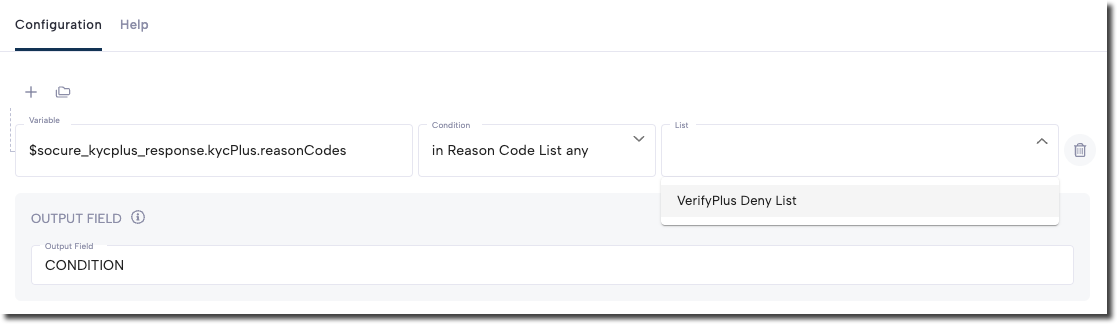
Once a reason code list is created, you can use it in a workflow condition. For example, you might write a condition that checks if any of the reason codes in the Verify+ Deny Reason Code List is present. This makes it easy to apply the same set of reason codes consistently across your workflows, improving decision-making and simplifying your configuration.
Managing existing lists
You can manage and update existing reason code lists by:
- Adding new reason codes.
- Removing outdated or irrelevant reason codes.
This ensures that your reason code lists remain up-to-date and relevant as your workflows evolve.
Note:
- Editing a reason code list will have an immediate effect on the workflow, without creating a new workflow version.
- Changes to reason code lists will not show up in the audit logs.
Updated 4 months ago