

Integrate Hosted Flows
Learn how to use Socure Hosted Flows with the RiskOS™ Evaluation API to collect user data and verify identities.
Hosted Flows API integration guide
Hosted Flows can be configured for a variety of use cases and may include an End User Experience Wait Step (i.e., a step that RiskOS™ recognizes as asynchronous, where the workflow pauses and waits for user interaction/input on the UX screen such as capturing PII).
Advanced Prefill via Hosted UX
-
Initiate workflow: The client sends a
POSTrequest to Socure’s RiskOS™ Evaluation API to start the Hosted UX workflow. The request must include:custom.redirect_uri– the URL where the user will be redirected after completing the hosted flow
-
Receive evaluation ID and redirect URL: Socure responds with:
201 Createdstatusevaluation_id- Hosted UX
redirect_urito begin the user interaction
-
Redirect user to Hosted UX: The client redirects the user to the Socure-hosted flow using the provided
redirect_uri. -
Advanced Prefill – User input: Within the hosted flow, the
advanced_prefillphase is initiated where the user enters:- Phone number
- Date of birth
-
Risk evaluation and One-Time Passcode (OTP) challenge: Socure performs the following device integrity checks: Digital Intelligence, Allow/Deny List, Phone Risk Score, OTP, CNAM (Caller Name Delivery), and Phone-Name Correlation. If the device checks fail or indicate risk, the flow introduces friction to verify possession using an OTP sent via SMS.
-
OTP entry and validation: If the user passes Digital Intelligence and the initial Phone Risk Score check, the system validates device possession via OTP. The user enters the OTP directly within the hosted session. For Sandbox, entering any 6-digit code is successful, except for
000000, which simulates a failed OTP response. -
Name retrieval and validation: After validating possession of the phone, CNAM is used to retrieve the user’s name. Socure Phone Risk Score is used to correlate the phone number with the name. If successful, the enriched identity data (first name, last name, SSN, address) is retrieved if there is a match with the prefill.
-
Data review and confirmation: The user is shown the prefilled identity data for review and can confirm or update it.
-
Additional input: If not already collected, the user can also be prompted to provide their email address (optional and configurable).
Consumer Onboarding via Hosted UX
-
Consumer onboarding initiated: Once the user confirms the data, the flow automatically progresses the user’s PII through KYC and Fraud checks.
-
Risk checks and enrichment: Socure performs identity verification, sanctions checks, and other enrichment modules to assess risk.
-
Step-up to DocV (if required): If risk signals exceed certain thresholds, the user is stepped up to complete DocV (DocV Overview Guide):
- Document and selfie capture
- All handled within the hosted session
- No SDK or UI implementation needed by the client
-
User completes hosted flow: Once onboarding (and any DocV) is complete, Socure:
- Finalizes the evaluation and redirects the user back to the client via
custom.redirect_uri
- Finalizes the evaluation and redirects the user back to the client via
-
Client receives decision via webhook: Socure sends asynchronous webhook notifications containing the final decision:
ACCEPT,REJECT, or other status- The client system can now proceed with onboarding logic or error handling based on the response.
-
Retrieve user inputs: To access the data inputs provided by the user during the Hosted UX flow, make a
GETrequest to the RiskOS™ Evaluation API using theevaluation_idreturned from the initialPOSTrequest.
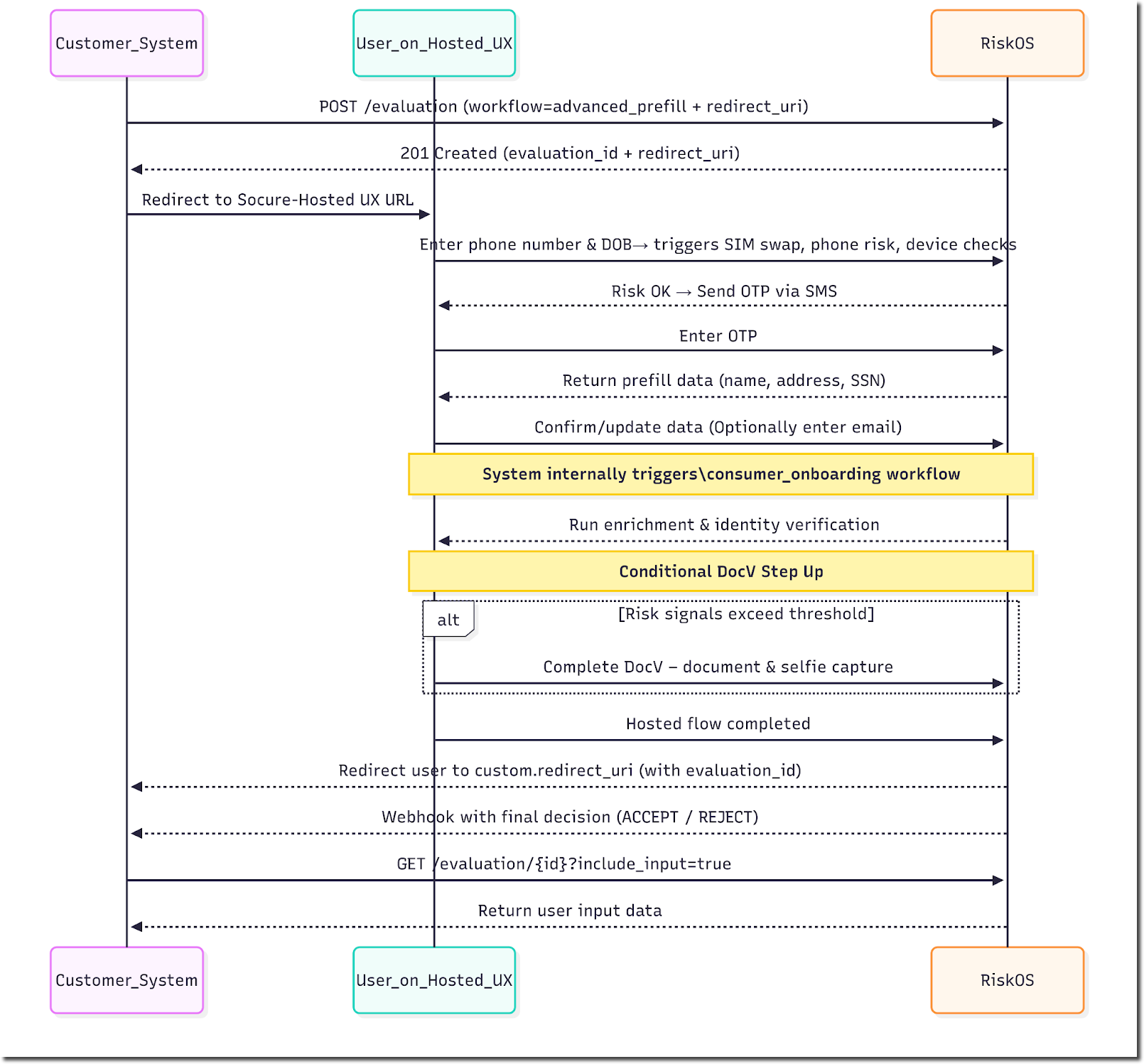
Socure Hosted UX orchestrates most of the flow and reduces integration burden.
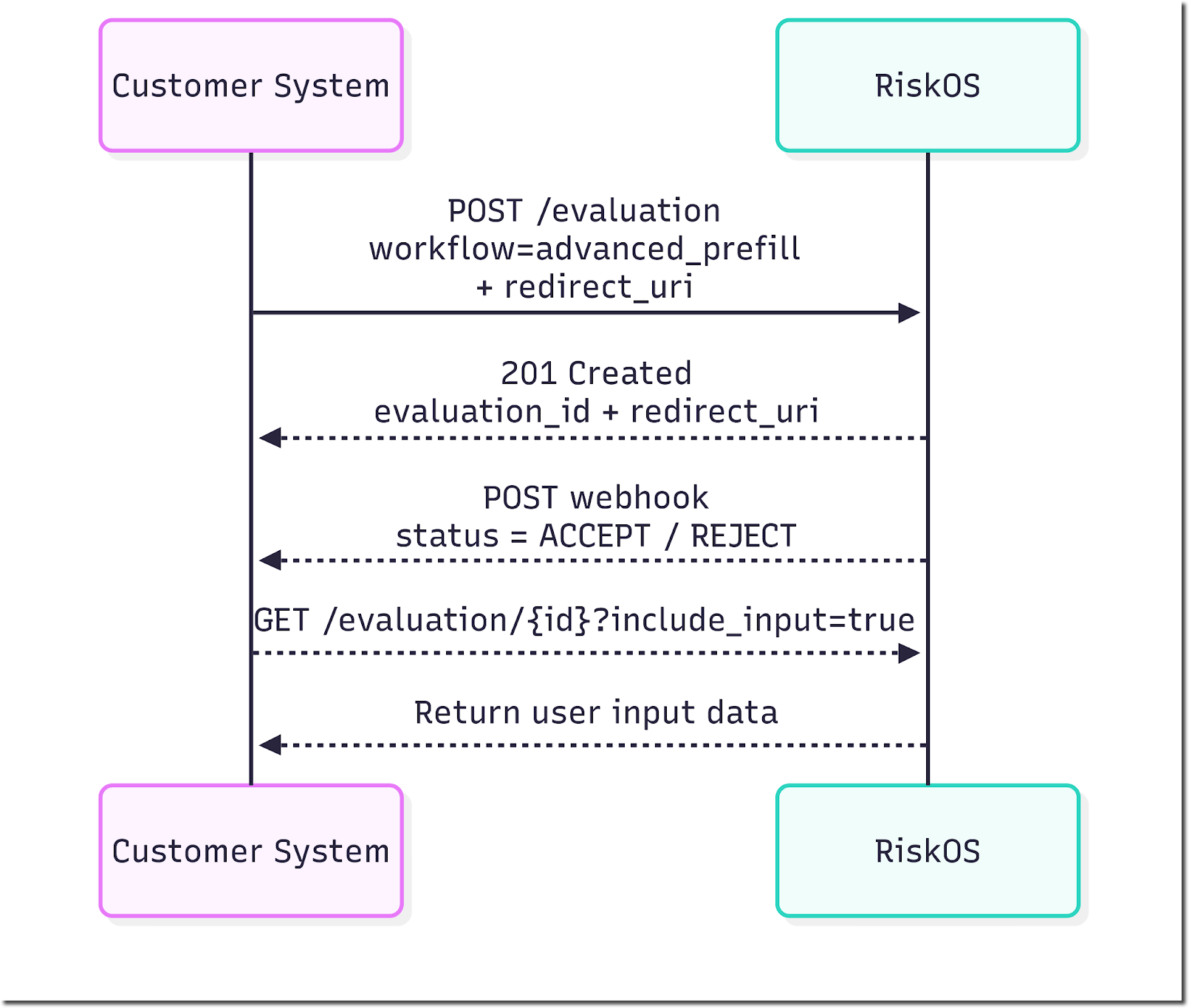
Example request
custom.redirect_uri is the URL that customers specify (typically the customer’s application where the RiskOS™ workflow is initiated). RiskOS™ will redirect the user here upon completion of the hosted flow.
curl --request POST \
     --url 'https://riskos.sandbox.socure.com/api/evaluation' \
     --header 'Authorization: Bearer YOUR_API_KEY' \
     --header 'Content-Type: application/json' \
     --header 'Accept: application/json' \
     --data '{
  "id": "{{$randomUUID}}",
  "timestamp": "2022-07-28T06:10:54.298Z",
  "workflow": "advanced_pre_fill",
  "data": {
    "individual": {
      "id": "9876543",
      "docv": {
        "config": {
          "send_message": true
        }
      }
    },
    "custom": {
      "redirect_uri": "https://xyz.co/"
    }
  }
}'
import os
import requests
url = "https://riskos.sandbox.socure.com/api/evaluation"
headers = {
"Authorization": f"Bearer {os.getenv('YOUR_API_KEY')}",
"Content-Type": "application/json",
"Accept": "application/json"
}
payload = {
"id": "{{$randomUUID}}",
"timestamp": "2022-07-28T06:10:54.298Z",
"workflow": "advanced_pre_fill",
"data": {
"individual": {
"id": "9876543",
"docv": {
"config": {
"send_message": True
}
}
},
"custom": {
"redirect_uri": "https://xyz.co/"
}
}
}
response = requests.post(url, headers=headers, json=payload)
data = response.json()Example response
The redirect_uri in the RiskOS™ Evaluation response is the Socure-hosted flow that a customer’s application can embed or launch in as a WebView.
{
  "id": "8a2d460d-9e04-4a1e-8b97-dbe7a5e2f85a",
  "workflow": "advanced_pre_fill",
  "workflow_id": "18e53e52-070d-4348-99d8-6076c88163ce",
  "workflow_version": "5.30.0",
  "eval_source": "API",
  "eval_id": "6f103105-d453-4aa1-ae03-ed7fd791b8d5",
  "eval_start_time": "2025-08-14T20:10:04.535744506Z",
  "eval_end_time": "2025-08-14T20:10:04.538028736Z",
  "decision": "REVIEW",
  "decision_at": "2025-08-14T20:10:04.538038266Z",
  "status": "ON_HOLD",
  "sub_status": "More information needed",
  "tags": [],
  "notes": "",
  "review_queues": ["Default Queue"],
  "eval_status": "evaluation_paused",
  "environment_name": "Sandbox",
  "redirect_uri": "https://riskos.sandbox.socure.com/hosted/27017931-f19b-4ae8-b7dc-d11e29331f51"
}
Example request to retrieve evaluation
You can retrieve the evaluation details including any information (e.g. PII) that was captured in the Socure Hosted Flow using a GET call to the RiskOS™ Evaluation API with the specific eval_id and specifying include_input request parameter set to true. See example below:
curl --request GET \
     --url 'https://riskos.socure.com/api/evaluation/3ece6224-5aec-4f42-b1e5-345a1551f98a?include_input=true' \
     --header 'Accept: application/json'
import requests

url = "https://riskos.socure.com/api/evaluation/3ece6224-5aec-4f42-b1e5-345a1551f98a?include_input=true"
headers = {
    "Accept": "application/json"
}

response = requests.get(url, headers=headers)
data = response.json()
Sample response
The RiskOS™ Evaluation response will return the evaluation details including decision, status and data enrichments processed based on how the workflow executed.
If include_input parameter is set to true when making a GET call to RiskOS™ Evaluation API, RiskOS™ will return input.updated_data section. The updated_data section will return all the inputs captured by the Socure Hosted Flow (e.g. PII). See example below (be sure to scroll all the way down).
{
    "id": "55820116-af55-4e8c-8127-f14c68259458",
    "workflow": "consumer_onboarding",
    "workflow_id": "52c447f4-b7e1-4336-a433-1927c3a93106",
    "workflow_version": "7.25.0",
    "eval_source": "API",
    "eval_id": "95e487f0-56cf-4557-b6ab-3e3b4ac3245f",
    "eval_start_time": "2025-10-14T19:58:31.621710341Z",
    "eval_end_time": "2025-10-14T19:59:53.881953481Z",
    "decision": "ACCEPT",
    "decision_at": "2025-10-14T19:59:53.881826755Z",
    "status": "CLOSED",
    "sub_status": "Accept",
    "tags": null,
    "notes": "",
    "review_queues": [
        "Default Queue"
    ],
    "data_enrichments": [
        {
            "enrichment_name": "Socure Address Risk dynamic",
            "enrichment_endpoint": "https://sandbox.socure.com/api/3.0/EmailAuthScore",
            "enrichment_provider": "Socure",
            "status_code": 200,
            "request": {
                "city": "seattle",
                "country": "US",
                "firstName": "Deirdre",
                "modules": [
                    "addressrisk"
                ],
                "physicalAddress": "101 Main st",
                "state": "wa",
                "surName": "Roscoe",
                "zip": "77777"
            },
            "response": {
                "addressRisk": {
                    "reasonCodes": [
                        "I705",
                        "I707",
                        "I708"
                    ],
                    "score": 0.01,
                    "scores": [
                        {
                            "name": "RiskAddressNOIPUS.V8__Uniform.V1",
                            "score": 0.01,
                            "version": "4.0"
                        }
                    ]
                },
                "nameAddressCorrelation": {
                    "reasonCodes": [
                        "I710",
                        "I708",
                        "I709"
                    ],
                    "score": 0.99
                },
                "referenceId": "894b49cb-49dc-4825-a428-875c53d29ed1"
            },
            "is_source_cache": false,
            "total_attempts": 1
        }
    ],
    "eval_status": "evaluation_completed",
    "score": 11,
    "environment_name": "Sandbox",
    "input": {
        "data": {
            "individual": {
                "email": "[email protected]",
                "di_session_token": "12349",
                "additional_context": {
                    "disclosure_purpose": "GLBA_502(e)"
                },
                "otp": {}
            },
            "custom": {
                "redirect_uri": "https://www.bolt.com"
            }
        },
        "updated_data": {
            "individual": {
                "given_name": "John",
                "family_name": "Smith",
                "national_id": "2345",
                "date_of_birth": "1985-05-31",
                "phone_number": "+17756436435",
                "address": {
                    "line_1": "101 Main st",
                    "country": "US",
                    "postal_code": "77777",
                    "minor_admin_division": "seattle",
                    "major_admin_division": "wa"
                },
                "otp": {
                    "code": "456345"
                }
            }
        }
    }
}
Native iOS integration
Here's a sample code snippet to launch the Socure Hosted Flow in a WebView:
import SafariServices

let hostedUXURL = URL(string: "https://riskos.sandbox.socure.com/hosted/2ce4af07-9be0-42c5-be50-e3667a6c3268")!
let safariVC = SFSafariViewController(url: hostedUXURL)
present(safariVC, animated: true, completion: nil)
You are able to specify how to get the control back when the Hosted Flow completes by specifying a redirect uri. You can specify data.custom.redirect_uri when making the RiskOS™ Evaluation API request. When the Hosted Flow is complete, the Hosted Flow will redirect to the redirect uri you specified in the RiskOS™ Evaluation API request. Once you get the control back, you can choose to decide how to close the Socure hosted Flow.
Native Android integration
Here's a sample code snippet to launch the Socure Hosted Flow in a WebView
import androidx.browser.customtabs.CustomTabsIntent

val hostedUXUrl = "https://riskos.sandbox.socure.com/hosted/2ce4af07-9be0-42c5-be50-e3667a6c3268"
val customTabsIntent = CustomTabsIntent.Builder().build()
customTabsIntent.launchUrl(this, Uri.parse(hostedUXUrl))
You are able to specify how to get the control back when the Hosted Flow completes by specifying a redirect uri. You can specify data.custom.redirect_uri when making the RiskOS™ Evaluation API request.When the Hosted Flow is complete, the Hosted Flow will redirect to the redirect uri you specified in the RiskOS™ Evaluation API request. Once you get the control back, you can choose to decide how to close the Socure hosted Flow.
Updated 27 days ago