

Integrate eCBSV
Learn how to call the RiskOS™ Evaluation API for real-time SSN, Name, and DOB validation with the SSA
Overview
This guide shows you how to:
- Collect the consumer's name, date of birth, and SSN, along with the consumer's consent to verify their SSN with the SSA.
- Submit a
POST /api/evaluationrequest from your backend with the collected data. - Act on the
decisionfield (ACCEPT,REVIEW, orREJECT) in the response to route the consumer. - Use the SSA verification result to confirm whether the SSN, name, and date of birth match.
Before you start
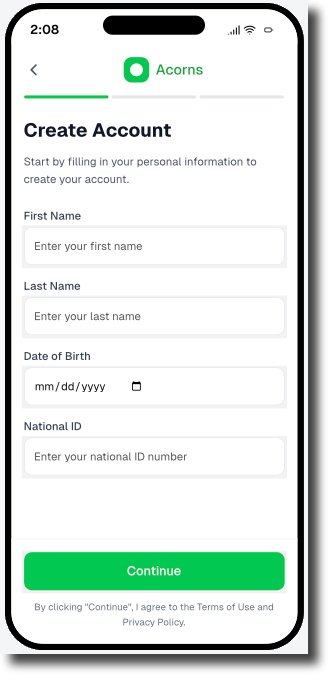
Example frontend input form (mapped to /api/evaluation payload)
/api/evaluation payload)This example screen shows how a mobile app might capture user information during onboarding before triggering a RiskOS™ /api/evaluation request.
Each field maps to required parameters in the data.individual object:
- First Name →
given_name - Last Name →
family_name - Date of Birth →
date_of_birth - National ID →
national_id
You can configure which fields each workflow requires by adjusting module-level match logic in RiskOS™.
Start an evaluation
Endpoint
Start with Sandbox for development and testing, then move to Production for live applications.
POST https://riskos.sandbox.socure.com/api/evaluationPOST https://riskos.socure.com/api/evaluationAuthentication
Include your API key in the Authorization header as a Bearer token, with standard JSON headers:
Authorization: Bearer YOUR_API_KEY
Content-Type: application/json
Accept: application/json
X-API-Version: 2025-01-01.orion   # optional – pins a specific API version
Example request
curl --location --request POST 'https://riskos.sandbox.socure.com/api/evaluation' \
  --header 'Content-Type: application/json' \
  --header 'Accept: application/json' \
  --header 'Authorization: Bearer YOUR_API_KEY' \
  --data-raw '{
    "id": "APP-987654",
    "timestamp": "2025-08-13T06:10:54.298Z",
    "workflow": "consumer_onboarding",
    "data": {
      "individual": {
        "given_name": "Shannon",
        "family_name": "Zhao",
        "date_of_birth": "1973-06-20",
        "national_id": "136582341",
        "country": "US",
        "additional_context": {
          "user_consent": true,
          "consent_timestamp": "2025-08-19T18:24:00.000Z"
        }
      }
    }
  }'
import os
import requests
url = "https://riskos.sandbox.socure.com/api/evaluation"
headers = {
"Content-Type": "application/json",
"Accept": "application/json",
"Authorization": f"Bearer {os.getenv('YOUR_API_KEY')}"
}
payload = {
"id": "APP-987654",
"timestamp": "2025-08-13T06:10:54.298Z",
"workflow": "consumer_onboarding",
"data": {
"individual": {
"given_name": "Shannon",
"family_name": "Zhao",
"date_of_birth": "1973-06-20",
"national_id": "136582341",
"country": "US",
"additional_context": {
"user_consent": True,
"consent_timestamp": "2025-08-19T18:24:00.000Z"
}
}
}
}
response = requests.post(url, headers=headers, json=payload)
data = response.json()Request schema
Validation rules & accuracy guidance
eCBSV runs only in an explicit eCBSV workflow. These rules ensure RiskOS™ can submit the verification.
Required fields
Every request must include:
given_namefamily_namedate_of_birthnational_id(full 9-digit SSN — not an ITIN or last 4)countryadditional_context.user_consentset totrueadditional_context.consent_timestamp
Accuracy guidance
Provide the full 9-digit SSN in national_id. If additional_context.user_consent is null, eCBSV is skipped silently.
Top-level fields
Path: root request object
| Field | Type | Required | Description | Example |
|---|---|---|---|---|
id | String | Required | Required, customer-defined unique identifier for the request. This value must be unique for each evaluation. Reusing an ID causes RiskOS™ to treat the request as a re-run and can impact processing behavior, results, and downstream workflows. | "APP-987654" |
timestamp | String | Required | Timestamp when evaluation was initiated. | "2025-08-13T06:10:54.298Z" |
workflow | String | Required | RiskOS™ workflow name. Note: The workflow name must be unique within your RiskOS™ environment. It is not scoped by use case and must identify a single active workflow for each Evaluation API request. | "consumer_onboarding" |
data | Object | Required | Primary request payload container. | |
→individual | Object | Required | Primary identity object containing account information. | See individual schema below. |
individual fields
individual fieldsPath: data.individual
| Field | Type | Required | Description | Example |
|---|---|---|---|---|
given_name | String | Required | Individual’s first or given name. | "Shannon" |
family_name | String | Required | Individual’s last or family name. | "Zhao" |
national_id | String | Required | Government-issued ID. | "136582341" |
date_of_birth | String | Required | Individual’s date of birth, formatted as YYYY-MM-DD. | "1973-06-20" |
country | String | Required | ISO 3166-1 alpha-2 code representing the individual’s country of residence. | "US" |
additional_context | object | Required | Use this field to pass additional data required by specific Socure products. | |
→user_consent | Boolean | Required | Indicates whether the individual explicitly provided consent for verification. | true |
→consent_timestamp | String <Date-Time> | Required | Date and time (RFC 3339 format) when consent was recorded. | "2025-08-19T18:24:00.000Z" |
Example response
When you call the Evaluation API, RiskOS™ returns a JSON payload that includes the final decision, evaluation metadata, and enrichment-specific results.
{
  "id": "APP-987654",
  "eval_id": "c9e53a0f-35f4-4d18-bf26-ec1788c9f47a",
  "decision": "REVIEW",
  "tags": [
    "low_id_coverage",
    "manual_review_required"
  ],
  "review_queues": [
    "kyc-us"
  ],
  "data_enrichments": [
    {
      "enrichment_name": "eCBSV",
      "enrichment_endpoint": "https://sandbox.dev.socure.com/api/3.0/EmailAuthScore",
      "enrichment_provider": "Socure",
      "status_code": 200,
      "request": {
        "country": "US",
        "firstName": "Shannon",
        "surName": "Zhao",
        "dob": "1973-06-20",
        "nationalId": "136582341",
        "userConsent": true,
        "consentTimestamp": "2025-08-19T18:24:00.000Z",
        "modules": [
          "ecbsv"
        ]
      },
      "response": {
        "referenceId": "f3863a33-69ca-43c2-90e0-8b4344a41a09",
        "eCBSV": {
          "reasonCodes": [
            "I998",
            "I999"
          ]
        }
      }
    }
  ]
}
Key response fields
RiskOS™ returns a consistent set of top-level fields that describe the outcome of an evaluation, with enrichment-specific results that depend on your workflow configuration.
Where to find specific results
| Area | Fields | How to use it |
|---|---|---|
| Decision and routing | decision, decision_at, tags, review_queues, notes, score | Primary control signals. Branch application logic using decision. Use tags, queues, notes, and score for secondary routing, review, and explanation. |
| Module results | Module-specific fields (for example: reasonCodes, scores, extracted attributes) | Evidence and signals produced by workflow modules. Use for escalation, compliance review, investigation, and audit. |
| Identifiers and traceability | id, eval_id | Persist these identifiers to correlate API calls, logs, webhooks, GET requests, and support cases. |
| Enrichment execution | data_enrichments[] (response, status_code, total_attempts, is_source_cache) | Inspect enrichment outputs and detect provisioning issues, partial failures, retries, or cached responses. |
| Workflow context | workflow, workflow_id, workflow_version | Understand which workflow ran and which version produced the result. Useful for debugging and historical analysis. |
| Evaluation lifecycle | eval_status, status, sub_status | Execution and case state only. Useful for monitoring and asynchronous workflows. Do not use for business decisions. |
| Execution context | eval_source, eval_start_time, eval_end_time, environment_name | Observability and performance metadata for latency tracking, environment validation, and API vs Dashboard attribution. |
Decision and routing (primary control signals)
These fields describe the outcome of an evaluation and any routing applied by the workflow.
decisionvalues are workflow-specific and may differ from the examples shown in this guide.
| Field | Type | Description | Example |
|---|---|---|---|
decision | String (enum) | Final evaluation result. Possible values: • ACCEPT• REVIEW• REJECTNote: The fields returned can be customized to fit your integration or business needs. | "REVIEW" |
decision_at | String <Date-Time> | RFC 3339 timestamp when the decision was finalized. | "2025-08-19T18:24:32.114Z" |
score | Number | If configured for a workflow, provides an aggregate score of all steps. This can be used for risk banding, additional routing, or analytics alongside the primary decision value. | 0.42 |
tags | Array of Strings | Array of labels applied during the workflow to highlight routing choices, notable signals, or rule outcomes. Useful for reporting, segmentation, or UI highlighting in the RiskOS™ Dashboard. | ["low_id_coverage", "manual_review_required"] |
review_queues | Array of Strings | Lists any manual review queues the evaluation was sent to. Empty when the case is fully auto-resolved without human review. | ["kyc-us"] |
notes | String | Freeform text field for analyst or system comments about the evaluation. Often used to capture manual review rationale or investigation context. | "Additional verification required due to limited ID coverage" |
Evaluation lifecycle and status
These fields describe where the evaluation is in its lifecycle and are useful for monitoring and asynchronous workflows.
| Field | Type | Description | Example |
|---|---|---|---|
eval_status | String (enum) | Internal RiskOS™ evaluation lifecycle state. Possible values: • evaluation_completed• evaluation_paused• evaluation_in_process | "evaluation_completed" |
status | String (enum) | Case-level status of the evaluation. Possible values: • OPEN• CLOSED | "CLOSED" |
sub_status | String | Provides additional detail about the evaluation status. Example values: • Under Review• Pending Verification• Accept• Reject | "Under Review" |
Identifiers and traceability
Use these fields to correlate requests, logs, webhooks, and support cases.
| Field | Type | Description | Example |
|---|---|---|---|
id | String (UUID or custom string) | Your evaluation identifier within RiskOS™. Note: This is customer-generated. | "APP-987654" |
eval_id | String (UUID) | RiskOS™-generated unique identifier for the evaluation. | "c9e53a0f-35f4-4d18-bf26-ec1788c9f47a" |
workflow | String | Name of the workflow executed. | "consumer_onboarding" |
workflow_id | String (UUID) | Unique identifier for the workflow run. | "fae769dc-832f-4619-a386-54873b8861e5" |
workflow_version | String | Version of the executed workflow. | "65.1.0" |
Execution context
These fields provide timing and environment context for the evaluation.
| Field | Type | Description | Example |
|---|---|---|---|
eval_source | String enum | Indicates where the evaluation was initiated from. Possible values: • API: Request submitted via the Evaluation API.• Dashboard: Case created or evaluated through the RiskOS™ Dashboard. | "API" |
eval_start_time | String <Date-Time> | RFC 3339 timestamp for when RiskOS™ started processing the evaluation. Useful for latency and performance monitoring. | "2025-10-07T23:50:03.60187976Z" |
eval_end_time | String <Date-Time> | RFC 3339 timestamp for when RiskOS™ finished processing the evaluation. Can be paired with eval_start_time to compute total processing time. | "2025-10-07T23:50:03.738794253Z" |
environment_name | String | Indicates which environment the evaluation ran in. Typically Sandbox for testing or Production for live traffic. | "Sandbox" |
Enrichment results
Enrichment outputs are returned in the data_enrichments array. Each object corresponds to a module executed as part of the Consumer Onboarding workflow.
| Field | Type | Description | Example |
|---|---|---|---|
enrichment_name | String | Name of the enrichment product. | "Socure eCBSV" |
enrichment_endpoint | String | API endpoint used for enrichment. | "https://sandbox.dev.socure.com/api/3.0/EmailAuthScore" |
enrichment_provider | String | Provider of the enrichment. | "Socure" |
status_code | Integer | HTTP status code of the enrichment call. | 200 |
request | Object | Payload sent to the enrichment provider. | See request schema below. |
response | Object | Response from the enrichment provider. | See response schema below. |
total_attempts | Integer | Number of attempts made to retrieve the data. | 1 |
request fields
request fields| Field | Type | Description | Example |
|---|---|---|---|
country | String | ISO 3166-1 alpha-2 country code. | "US" |
firstName | String | First name submitted. | "Shannon" |
surName | String | Last name submitted. | "Zhao" |
nationalId | String | SSN or national ID. | "136582341" |
dob | String (YYYY-MM-DD) | Date of birth. | "1973-06-20" |
userConsent | Boolean | Indicates if user provided consent. | true |
consentTimestamp | String <Date-Time> | Timestamp when consent was provided. | "2025-08-19T18:24:00.000Z" |
modules | Array of Strings | The Socure module(s) invoked for this enrichment call, as sent to the provider. Always present in the recorded request. | ["ecbsv"] |
response fields
response fields| Field | Type | Description | Example |
|---|---|---|---|
referenceId | String (UUID) | Unique identifier assigned to each enrichment after a RiskOS™ workflow is finalized. | "f3863a33-69ca-43c2-90e0-8b4344a41a09" |
eCBSV | Object | Results from eCBSV evaluation. | See eCBSV schema below. |
→reasonCodes | Array of Strings | Decision reason codes returned. | ["I998", "I999"] |
Apply routing logic
Apply the decision parameter to your application:
if response.get("decision") == "PASS":
    proceed_with_onboarding()
elif response.get("decision") == "REVIEW":
    trigger_manual_review(queue=response.get("review_queues", ["Default"])[0])
elif response.get("decision") == "FAIL":
    reject_application(reason="Identity verification failed")
else:
    log_warning("Unknown decision value", response.get("decision"))
Use RiskOS™ logs to trace enrichment execution and reason code evaluation logic. For auditability, log the full response payload and decision scores per field.
Test in Sandbox
You can simulate almost any identity scenario using our Test Personas JSON file. Each entry includes a realistic, sandbox-only identity and a ready-to-use API request payload. Many entries also include the expected response to help you validate your /api/evaluation integration before going live.
- Endpoint:
POST /api/evaluation - Base URL (Sandbox):
https://riskos.sandbox.socure.com/api/evaluation - Auth:
Authorization: Bearer YOUR_SANDBOX_KEY
ACCEPT response
ACCEPT response{
"decision": "ACCEPT",
"data_enrichments": [
{
"status_code": 200,
"response": {
"referenceId": "f3863a33-69ca-43c2-90e0-8b4344a41a09",
"eCBSV": {
"reasonCodes": [
"I998", "I999"
]
}
}
}
]
}REVIEW response
REVIEW response{
"decision": "REVIEW",
"data_enrichments": [
{
"status_code": 200,
"response": {
"referenceId": "f3863a33-69ca-43c2-90e0-8b4344a41a09",
"eCBSV": {
"reasonCodes": [
"R998","R992", "I993", "I994"
]
}
}
}
]
}REJECT response
REJECT response{
"decision": "REJECT",
"data_enrichments": [
{
"status_code": 200,
"response": {
"referenceId": "f3863a33-69ca-43c2-90e0-8b4344a41a09",
"eCBSV": {
"reasonCodes": [
"R998","R992", "R993", "R994"
]
}
}
}
]
}Best practices for integration and maintenance
- Always validate API inputs against the expected schema.
- Use sandbox mode and known test identities during QA.
- Enable and monitor
reasonCodesfor transparency and auditability. - Use
decision,tags, andreview_queuesto drive routing logic in your RiskOS™ workflow. - Log and store evaluation payloads and responses for compliance, dispute resolution, and improvement.
Other relevant API endpoints exposed via RiskOS™
RiskOS™ supports a range of identity verification use cases through modular API endpoints. These modules can be configured independently or combined within workflows to meet regional compliance requirements, fraud detection strategies, and onboarding needs.
Validation checklist
Test coverage
PASS
FAIL or REVIEW
Schema and error handling
Logging and observability
Exception routing
REVIEW
Updated about 19 hours ago