

Set Up Account Intelligence
Learn how to configure Account Intelligence in a RiskOS™ workflow, what inputs it requires, what outputs it returns, and how to use those outputs in routing and decision logic.
Before you start
Make sure you have the following:
Access to the RiskOS™ Dashboard with the Account Intelligence enrichment enabled.
-
Your account owner or administrator can enable this for you. If you're unsure who to contact, reach out to support for assistance.
A basic understanding of RiskOS™ workflows and components.
-
If this is your first time working with workflows, review the Workflow overview to understand inputs, enrichments, routing logic, and decisions.
Using Account Intelligence in a RiskOS™ Workflow
Account Intelligence runs as an Enrichment within a RiskOS™ workflow. During an evaluation, RiskOS™ verifies the inputs and returns account verification signals that can be used throughout the remainder of the workflow, including:
- Conditions
- Decision Rules
- Rule Scorecards
- Manual Review
- Decisions
Example execution flow in RiskOS™
Account Intelligence runs synchronously as part of a RiskOS™ workflow. There is no user handoff or pause in execution. At a high level, the execution flow looks like this:
-
Input: You call the Evaluation API with account details and supporting identity attributes.
-
Account Intelligence enrichment: RiskOS™ evaluates account availability (status) and ownership using configured inquiry types.
-
Routing logic: The workflow evaluates availability, ownership, and reason codes.
-
Decision: The workflow returns a final outcome (for example, Accept, Review, or Reject).
flowchart LR
    A[Input]
    B[Account Intelligence]
    C[Routing logic]
    D[Decision]

    A --> B --> C --> D
Configure Account Intelligence
How to add Account Intelligence to a workflow
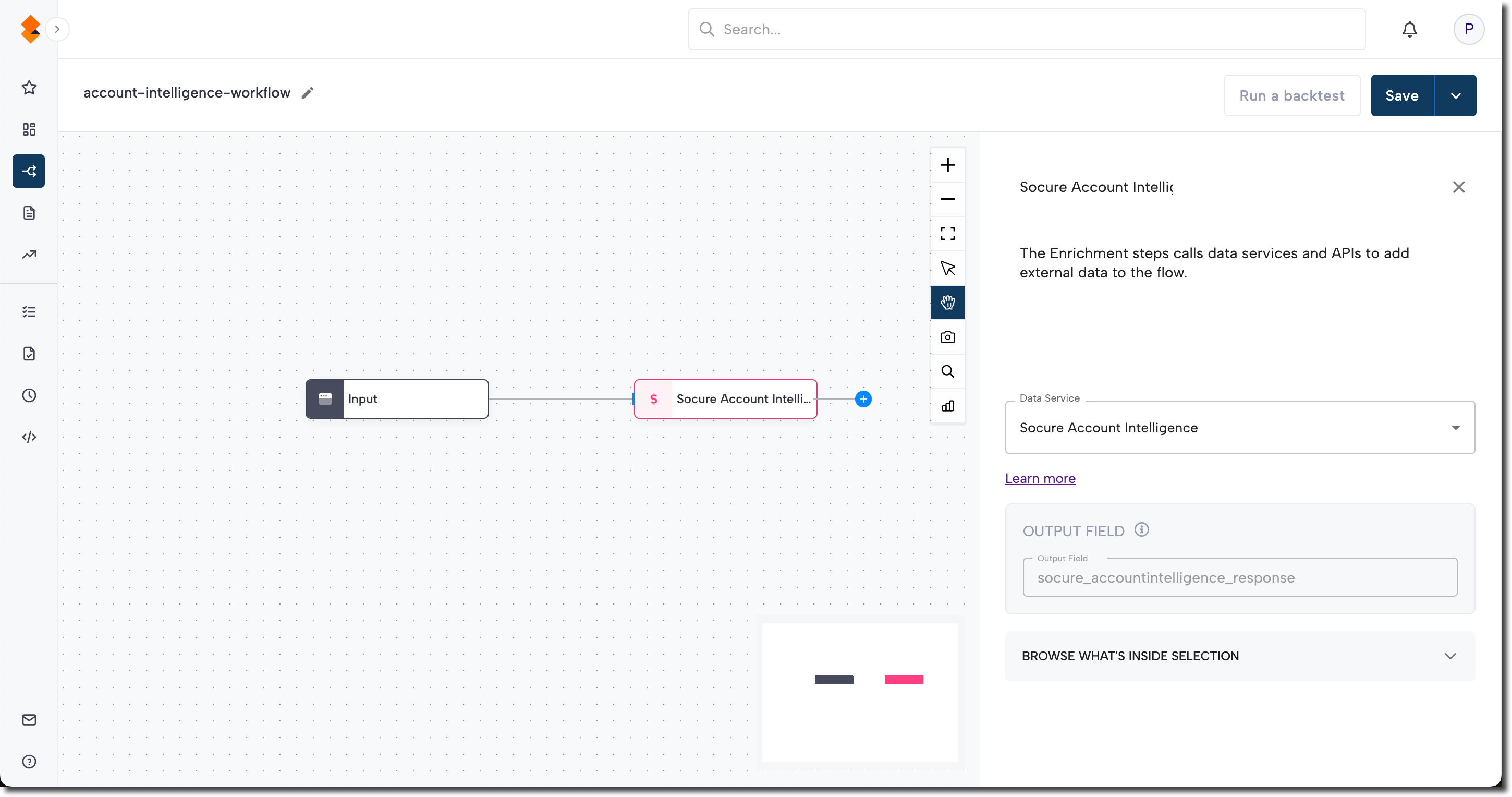
- In the RiskOS™ Dashboard, go to Workflows and create a new workflow or open an existing one.
- On the workflow canvas, select the plus (+) icon.
- Add an Enrichment step and select:
- Socure Account Intelligence, or
- Socure Account Intelligence Premier
Account Intelligence Inputs
Account Intelligence evaluates the account and identity data provided through your workflow. Providing complete, accurate inputs improves signal quality.
Required inputs
For a domestic (United States) request:
data.individual.account.account_number— Bank account number to validate.data.individual.account.routing_number— Bank routing number for the account.data.individual.account.account_inquiries— The checks to perform:AVAILABILITY,OWNERSHIP, or both.
For ownership checks, also provide given_name and family_name (individuals) or the business name (businesses).
For international requests, required identifiers vary by market (for example, iban, swift_bic, or clearing_system_id). See Account Intelligence Geographic Coverage for country-specific requirements.
Optional supporting inputs
When available, include these fields to improve ownership accuracy:
national_id(SSN) oreindate_of_birthemailandphone_numberaddress
Omitting optional fields does not prevent execution, but may limit ownership confidence.
Account Intelligence Outputs
After the enrichment executes, the following signals become available throughout your workflow.
| Output | Range | Purpose |
|---|---|---|
availabilityScore | 0.0 – 1.0 | Likelihood that the bank account is currently open and active. Higher values indicate greater availability. |
ownershipScore | 0.0 – 1.0 | Probability that the provided PII matches the true account holder. Higher values indicate a stronger match. |
| Reason codes | Categorical | Explain the factors behind the scores. |
Understanding Account Intelligence Score Outputs
availabilityScore
availabilityScore | Score Range | Classification | Description |
|---|---|---|
| 0.70-1.00 | High Availability | Account is able to accept ACH transactions based on historical observations and a lack of negative info. We recommend accepting the account. |
| 0.6-0.67 & 0.69 | N/A | Calibrated range for evolving intelligence models. |
| 0.68 | No Data Found | No data found, but account structure passed. |
| 0.41-0.59 | Potential Risk | Historical observations suggest that the account may not be open for withdraws due to reasons such as unpaid returns or unauthorized use. |
| 0.40 | Validation Failed | The account number does not pass semantic validation for the institution. |
| 0.0-0.39 | Very High Risk | Data indicates that the account is invalid, frozen or closed. We do not recommend accepting the account. |
ownershipScore
ownershipScore| Score Range | Classification | Description |
|---|---|---|
| 0.8-1.0 | High Corroboration | 0.8-0.89: High corroboration between supplied vs. observed identity, with limited conflicting information 0.9–1.0: High corroboration between supplied vs. observed identity, with almost no conflicting information |
| 0.7-0.79 | Medium Corroboration | Medium corroboration between supplied vs. observed identity. Some elements do not match historical observations (Ex: Positive match made on SSN, but not on DOB.) |
| 0.51-0.69 | Low Corroboration | Minimal corroboration between supplied identity and account observations (Ex: Some identity elements match, but not all or most.) |
| 0.0-0.5 | No Data/Negative Data | 0–0.49: No positive corroboration found between supplied vs. observed identity 0.5: Unknown, no data present (Ex: Conflicting negative information found.) |
Common Routing Patterns
Account Intelligence signals can be used in conditions and decision rules to route evaluations. The examples below illustrate common routing patterns. Always configure score thresholds and routing actions based on your organization's risk tolerance and business policies.
Availability-based routing
| Condition | Suggested action | Rationale |
|---|---|---|
Low availabilityScore | REVIEW or REJECT | Low confidence the account is open and active. |
High availabilityScore | Continue | Strong confidence the account is available. |
Ownership-based routing
| Condition | Suggested action | Rationale |
|---|---|---|
Low ownershipScore | REVIEW or REJECT | Weak match between the identity and the account holder. |
Moderate ownershipScore | REVIEW | Apply additional controls before proceeding. |
High ownershipScore | Continue | Strong ownership match. |
Combined patterns
| Pattern | Suggested action | Rationale |
|---|---|---|
| High availability + high ownership | Continue | The account is open and the identity matches the account holder. |
| High availability + low ownership | REVIEW | The account is open but the holder may not match. |
| Low availability + any ownership | REVIEW or REJECT | The account may be closed or restricted. |
| Mid-range scores | REVIEW | Ambiguous signals should be reviewed, rather than pass or fail. |
Multi-enrichment Workflow Examples
Account Intelligence can easily be combined with other enrichments.
Account Intelligence + Verify
flowchart LR
    A[Input] --> B[Verify]
    A --> C[Account Intelligence]
    B --> D[Condition: identity + account]
    C --> D
    D --> E[Decision]
Confirm the applicant's identity with Verify / Verify+ first, then validate that the bank account exists and belongs to that identity. This pairs identity assurance with payment assurance before you move money.
Account Intelligence + Email Risk + Phone Risk
flowchart LR
    A[Input] --> B[Account Intelligence]
    A --> C[Email Risk]
    A --> D[Phone Risk]
    B --> E[Decision Rules: correlation]
    C --> E
    D --> E
    E --> F[Decision]
When ownershipScore is moderate, add Email Risk and Phone Risk correlation signals to strengthen the ownership decision instead of routing straight to review.
Workflow Testing Checklist
Use this checklist to confirm accuracy, resilience, and completeness before going live.
Related Enrichments
| Enrichment | Combination pattern |
|---|---|
| Sigma First-Party Fraud | Complement account validation with cross-industry intelligence that identifies repeat payment abuse, dispute abuse, and other first-party fraud patterns. |
| Digital Intelligence | Layer device and behavioral risk on top of account validation. |
Related Concepts
Updated 9 days ago