

Guardian Consent
Integrate Guardian Consent to capture parent or legal guardian approval before processing Predictive DocV identity verification sessions for minors.
Guardian Consent is a feature within Predictive DocV that captures consent from a parent or legal guardian before processing identity verification sessions for minors (users under the age of 18). The feature enables compliant identity verification workflows for minors while maintaining biometric consent requirements.
How Guardian Consent works
Without Guardian Consent enabled, if a minor completes a standard DocV flow, DocV rejects the verification session with reason code R844 indicating the user is a minor. The system deletes captured images and biometric data because biometric consent cannot be obtained directly from a minor.
With Guardian Consent enabled, the workflow captures guardian approval before verification completion, allowing the verification session to continue. The system may retain minor images and verification artifacts, and returns full verification results as part of the completed verification session.
Integration use cases
Guardian Consent supports two integration use cases, depending on whether you have the guardian's information when you start the evaluation:
- Use case 1: Known guardian information — You have the guardian's name and phone number on file and provide them with the RiskOS™ evaluation request. Guardian consent begins immediately.
- Use case 2: Guardian information not available — You don't have the guardian's information, or the user's age is unknown. The Capture App collects the guardian's name and phone number before starting Guardian Consent.
Both use cases converge on the same Guardian Consent experience and support consistent consent tracking, configuration, and webhook behavior.
Workflow overview
- A RiskOS™ evaluation is initiated. If guardian information (
given_name,family_name,phone_number) is provided in thedata.guardianobject, guardian consent begins immediately. If it isn't, the Capture App collects guardian information first. - The guardian receives a consent link through Socure-managed SMS delivery or a customer-managed handoff flow.
- The guardian opens the consent experience and either approves or declines consent.
- Declined: The workflow ends and the minor can't proceed with verification.
- Accepted: The minor verification link becomes active and the user continues through the standard Predictive DocV workflow.
- The system returns verification results that include both guardian and minor Digital Intelligence context at the completion of the session.
Note:
Phone Risk is executed against the guardian's name and phone number as part of the consent workflow. Digital Intelligence scorecards are independently executed against both the guardian and minor devices.
Use case 1: Known guardian information
When you have the guardian's name and phone number on file, provide them in the data.guardian object of the RiskOS™ evaluation request. Guardian consent begins immediately, and the Document Verification enrichment response returns separate links for the guardian consent experience and the minor verification experience.
Note:
For authentication headers and general request setup, see DocV Integration.
Endpoint
POST https://riskos.sandbox.socure.com/api/evaluationPOST https://riskos.socure.com/api/evaluationGuardian fields
Include these fields in the data.guardian object:
| Field | Type | Required | Description |
|---|---|---|---|
given_name | String | Required | The guardian's first name. |
family_name | String | Required | The guardian's last name. |
phone_number | String | Required | The guardian's phone number in E.164 format. Used for SMS consent notifications. |
docv | Object | Optional | DocV-specific configuration for the guardian consent flow. |
→ config | Object | Optional | Controls SMS notification behavior for the guardian consent flow. |
→ config.send_guardian_sms | Boolean | Optional | Set to true to have Socure send an SMS to the guardian phone number containing the consent link. If false or omitted, you receive the guardian link in the response payload and manage distribution yourself. |
→ config.send_minor_link_ready_sms | Boolean | Optional | Set to true to have Socure send an SMS to the minor after guardian approval indicating their verification link is ready. |
Example request
{
  "id": "APP-123456",
  "timestamp": "2025-07-31T15:00:10.761Z",
  "workflow": "consumer_onboarding",
  "data": {
    "individual": {
      "given_name": "John",
      "family_name": "Smith",
      "date_of_birth": "2010-05-07",
      "phone_number": "+19998887777",
      "address": {
        "line_1": "1234 N College Ave",
        "locality": "New York City",
        "major_admin_division": "NY",
        "country": "US",
        "postal_code": "10001"
      },
      "docv": {
        "config": {
          "send_message": true,
          "language": "en-us",
          "redirect": {
            "method": "POST",
            "url": "https://example.com/docv"
          }
        }
      }
    },
    "guardian": {
      "given_name": "Jane",
      "family_name": "Smith",
      "phone_number": "+12223334455",
      "docv": {
        "config": {
          "send_guardian_sms": true,
          "send_minor_link_ready_sms": true
        }
      }
    }
  }
}
Example response
The RiskOS™ workflow pauses and the Document Verification enrichment response returns both a guardian verification link and a minor verification link:
{
  "referenceId": "15357ffd-2fb7-4de8-b9ff-c3f3feb6deb4",
  "data": {
    "eventId": "5a150dab-27a3-436c-a488-3e8a8e33e5c5",
    "qrcode": "data:image/png;base64, iVBORw0KGgoAAA...",
    "url": "https://verify.socure.com/#/dv-sdk/5a150dab-27a3-436c-a488-3e8a8e33e5c5",
    "docvTransactionToken": "5a150dab-27a3-436c-a488-3e8a8e33e5c5",
    "guardianConsent": {
      "guardianDocvTransactionToken": "f3fd2f93-a3b9-430d-8f88-ac024dbe24ec",
      "guardianUrl": "https://verify.socure.com/#/dv-sdk/f3fd2f93-a3b9-430d-8f88-ac024dbe24ec",
      "childDocvTransactionToken": "5a150dab-27a3-436c-a488-3e8a8e33e5c5",
      "childUrl": "https://verify.socure.com/#/dv-sdk/5a150dab-27a3-436c-a488-3e8a8e33e5c5"
    }
  }
}
guardianConsent response fields
guardianConsent response fields| Field | Type | Description |
|---|---|---|
guardianDocvTransactionToken | String (UUID) | Transaction token for the guardian's consent session. |
guardianUrl | String (URL) | Consent link for the guardian. Distribute this link to the guardian if managing handoff yourself. |
childDocvTransactionToken | String (UUID) | Transaction token for the minor's document verification session. |
childUrl | String (URL) | Capture App link for the minor's document capture. Becomes active after guardian consent is accepted. |
Use case 2: Guardian information not available
When you don't have the guardian's information — or the user's age is unknown — omit the guardian fields from the evaluation request. The Document Verification enrichment response returns only the user's primary verification link, and the Capture App collects the guardian's name and phone number before starting Guardian Consent.
Example response
Without guardian information in the request, the response returns only the user's primary verification link and does not include the guardianConsent object:
{
  "referenceId": "15357ffd-2fb7-4de8-b9ff-c3f3feb6deb4",
  "data": {
    "eventId": "5a150dab-27a3-436c-a488-3e8a8e33e5c5",
    "qrcode": "data:image/png;base64, iVBORw0KGgoAAA...",
    "url": "https://verify.socure.com/#/dv-sdk/5a150dab-27a3-436c-a488-3e8a8e33e5c5",
    "docvTransactionToken": "5a150dab-27a3-436c-a488-3e8a8e33e5c5"
  }
}
In-app guardian information collection
The Capture App collects the guardian's name and phone number based on what you know about the user.
Known minor
If you know the user is a minor but don't have guardian information on file, the Capture App prompts the user to enter the guardian's name and phone number before proceeding to Guardian Consent.
Age unknown
If your population includes both adults and minors and the user's age isn't known, the Capture App supports age self-attestation:
- If the user self-attests as a minor, the Capture App routes them into the Guardian Consent workflow and prompts them for guardian information.
- If the user doesn't self-attest as a minor but then submits a document with a date of birth indicating they're under 18, the Capture App also routes them to Guardian Consent.
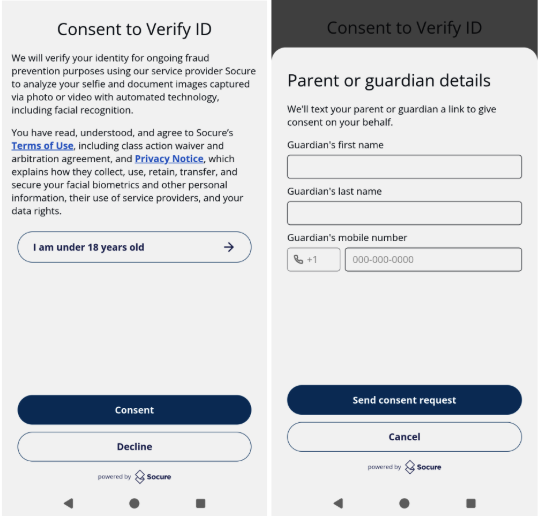
After the guardian provides consent, the minor completes the standard Predictive DocV flow. The completed verification response matches use case 1 — see Verification response.
Guardian consent flow
You can choose whether Socure sends the guardian SMS directly or whether to manage the guardian handoff yourself.
Socure-managed SMS (send_guardian_sms: true)
send_guardian_sms: true)When you set send_guardian_sms to true, Socure sends an SMS to the guardian phone number containing the consent link.
SMS message: Your minor has requested to have their identity verified by our service. Please click this link to consent: <link>
Customer-managed handoff (send_guardian_sms: false)
send_guardian_sms: false)When send_guardian_sms is set to false or omitted, you receive the guardianUrl in the response payload and distribute the consent link to the guardian through your own channel, such as SMS, email, or in-app notification.
Consent decision
When the guardian opens the consent link, they see the Guardian Consent screen where they may either approve or decline consent.
If the guardian approves consent:
- The minor verification link becomes active.
- The system triggers a
guardian_consent_acceptedwebhook. - If
send_minor_link_ready_smsistrue, Socure sends an SMS to the minor indicating their verification link is ready.
SMS message: Your parent/guardian approved your verification request. Tap to continue: <link>
If the guardian declines consent:
- The system triggers a
guardian_consent_rejectedwebhook. - The workflow ends and the minor can't proceed with verification.
Once the guardian accepts consent, the minor proceeds directly into document verification without additional consent prompts. Standard Predictive DocV fraud and liveness analysis continues to execute throughout the minor verification flow.
Verification response
After the minor completes the DocV flow, the verification response includes standard Predictive DocV results with both guardian and minor Digital Intelligence data.
The documentVerification object contains:
digitalIntelligence— Device intelligence data from the minor's deviceguardianDigitalIntelligence— Device intelligence data from the guardian's device
Example response
{
  "id": "APP-123456",
  "eval_id": "6dc8f39c-ecc3-4fe0-9283-fc8e5f99e816",
  "decision": "ACCEPT",
  "tags": [],
  "review_queues": [],
  "data_enrichments": [
    {
      "enrichment_name": "Socure DocV",
      "enrichment_endpoint": "https://sandbox.dev.socure.com/api/3.0/EmailAuthScore",
      "enrichment_provider": "Socure",
      "status_code": 200,
      "request": {
        "..."
      },
      "response": {
        "referenceId": "a1234b56-e789-0123-4fga-56b7c890d123",
        "documentVerification": {
          "reasonCodes": [
            "I834",
            "I823",
            "I826",
            "I845",
            "I820",
            "I831",
            "I838",
            "I836",
            "I824",
            "I822"
          ],
          "documentType": {
            "type": "Drivers License",
            "country": "USA",
            "state": "NY"
          },
          "decision": {
            "name": "standard",
            "value": "accept"
          },
          "documentData": {
            "firstName": "John",
            "surName": "Smith",
            "fullName": "John Smith",
            "address": "32194 N College Ave, New York City, NY 10001",
            "parsedAddress": {
              "physicalAddress": "32194 N College Ave",
              "physicalAddress2": "New York City NY 10001",
              "city": "New York City",
              "state": "NY",
              "country": "US",
              "zip": "10001"
            },
            "documentNumber": "00000000",
            "dob": "2010-05-07",
            "issueDate": "2021-01-12",
            "expirationDate": "2029-05-07"
          },
          "digitalIntelligence": {
            "device": {
              "id": "3dc9169c-73e9-4b71-98a5-097abf1a863e",
              "globalDeviceId": "e30be72a-d615-496e-b330-ee439ed51d0c",
              "sessionCreatedAt": "2026-05-27T00:39:11.919221590Z",
              "deviceCaptureAt": "2026-05-27T00:39:11.925328436Z",
              "computed": {
                "statisticalId": "551af88cd3fefce9ad10f8456987542690fd9b9cacedc1d04ebd4434a1499963",
                "isVirtualMachine": false,
                "sessionAgeMinutes": 8
              },
              "network": { "..." },
              "attributes": { "..." },
              "history": { "..." },
              "behavioral": { "..." },
              "latestNavigationContexts": [ "..." ],
              "velocityMetrics": {}
            },
            "signals": {}
          },
          "guardianDigitalIntelligence": {
            "device": {
              "id": "8fae3a8f-9e7b-4e8b-b9d8-2f6f2f1a1234",
              "globalDeviceId": "d7b2e6d1-91f4-4a87-8f33-2d90e6e56789",
              "sessionCreatedAt": "2026-05-27T00:36:02.114221590Z",
              "deviceCaptureAt": "2026-05-27T00:36:04.882328436Z",
              "computed": {
                "statisticalId": "9f2d88bc3a1d4a762bc4d88722a8f3d98c011a782e44ab81fabc123456789000",
                "isVirtualMachine": false,
                "sessionAgeMinutes": 3
              },
              "network": { "..." },
              "attributes": { "..." },
              "history": { "..." },
              "behavioral": { "..." },
              "latestNavigationContexts": [ "..." ],
              "velocityMetrics": {}
            },
            "signals": {}
          }
        }
      }
    }
  ]
}
Webhooks
The following webhooks can trigger during the Guardian Consent workflow:
| Webhook event | When it fires |
|---|---|
guardian_consent_requested | Guardian consent is requested. The guardian invitation link is generated. |
guardian_consent_accepted | The guardian approves consent. The minor verification link becomes active. |
guardian_consent_rejected | The guardian declines consent. The workflow ends. |
These webhooks appear as case notes within the RiskOS™ workflow. For more information on subscribing to DocV webhooks, see DocV Webhooks.
Session expiration behavior
Guardian and minor verification links share the same expiration window, and the configured DocV flow expiration time governs both.
Note:
Guardian consent is not retained independently of the verification session. If either session expires, you must initiate a new verification session — including collecting guardian consent again.
If guardian consent is not completed before the session expires:
- The workflow ends.
- The minor verification link becomes invalid.
- A new verification session must be initiated.
If guardian consent is completed but the minor verification session expires before verification is completed:
- The workflow ends.
- Guardian consent is not retained independently.
- Start a new verification session and collect guardian consent again.
This ensures that guardian approval remains tied to the active verification session and associated session risk signals.
Updated 1 day ago