

eCBSV Consent Requirements
Review required SSA consent statement language for eCBSV SSN verification, available in multiple languages for web and phone channels.
This guide walks through how to embed eCBSV consent into your digital and phone workflows—so it’s compliant, clear to users, and straightforward to implement.
Web consent
Before you call the eCBSV endpoint, you’ll need to collect the user’s consent.
Here’s exactly what to do.
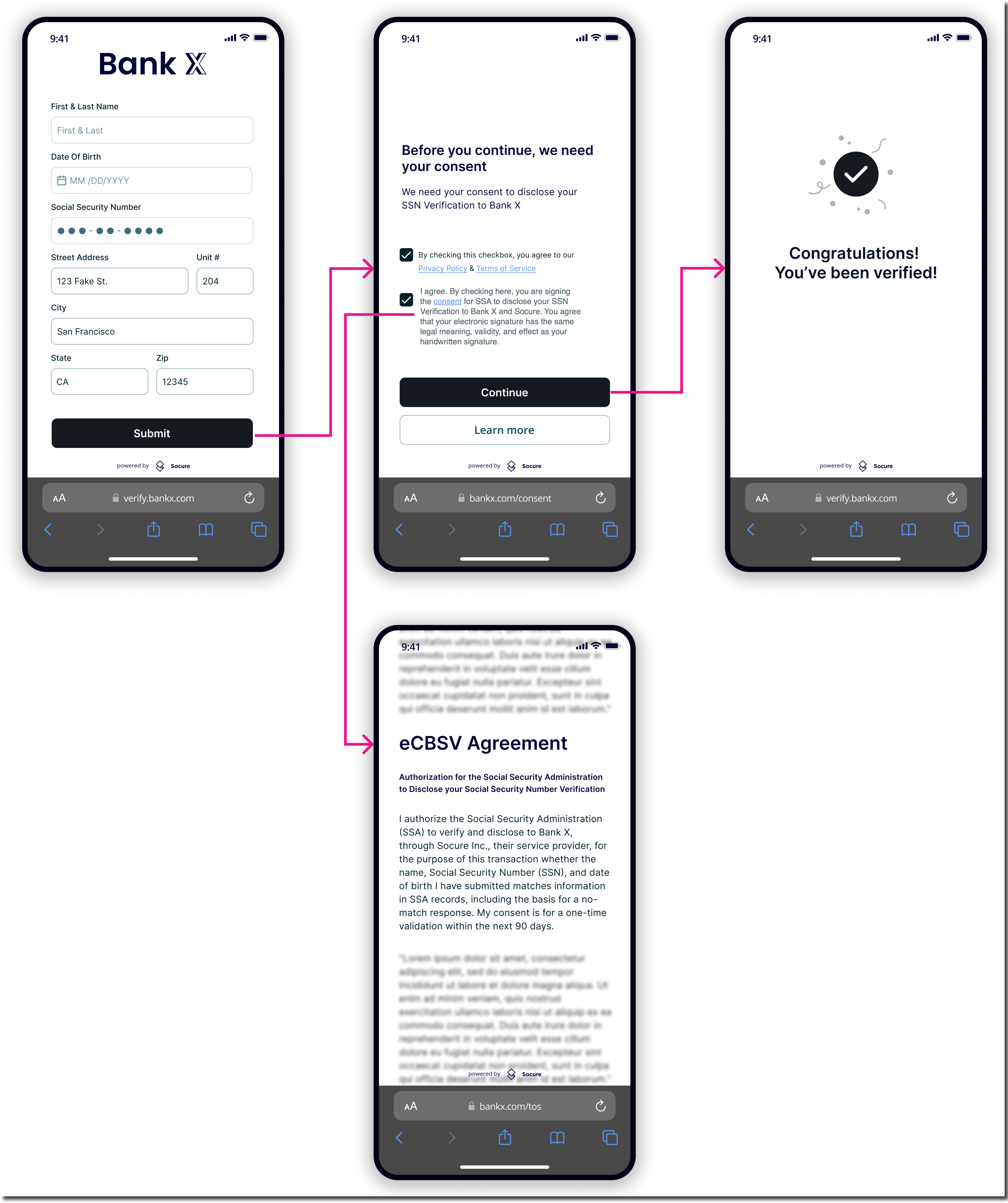
- Provide a signing mechanism for the user to indicate consent, along with the following intent-to-sign statement. Be sure to include a clickable link to your consent terms:☐ I agree. By checking here, you are signing the consent for SSA to disclose your SSN Verification to X Bank and Socure Inc. You agree that your electronic signature has the same legal meaning, validity, and effect as your handwritten signature.
- Embed the consent language either in a separate section or within the Terms and Conditions link.
- Display the following headline in bold, followed by the consent statement:
Authorization for the Social Security Administration to Disclose Your Social Security Number Verification
I authorize the Social Security Administration (SSA) to verify and disclose to [Name of Financial Institution], through Socure Inc., their service provider, for the purpose of this transaction whether the name, Social Security Number (SSN), and date of birth I have submitted matches information in SSA records, including the basis for a no-match response. My consent is for a one-time validation within the next 90 days. - Once you capture consent, you’re ready to send the request to the eCBSV enrichment. Store a record of consent and timestamp in your system for audit purposes.
Putting it all together
For optimal clarity and compliance within a standard application flow, format an exemplar consent prompt with a static purpose as follows:
Telephony consent
To obtain a user's consent electronically in a call center flow:- Have the call center agent enter the user's information into the RiskOS™ Dashboard.
- Read the eCBSV consent language and intent-to-sign statement to the user verbally or via an IVR.Authorization for the Social Security Administration to Disclose Your Social Security Number Verification
YOU authorize the Social Security Administration (SSA) to verify and disclose to [Name of Financial Institution] through Socure Inc., their service provider for the purpose of this transaction whether the name, Social Security Number (SSN) and date of birth YOU have submitted matches information in SSA records, including the basis for a no-match response. YOUR consent is for a one-time validation within the next 90 days. - Prompt the user to indicate consent by saying "I agree”, "I consent" or pressing a designated button via an IVR (if used).By responding "Yes," you are signing the consent for SSA to disclose your SSN Verification to [Permitted Entity and/or Financial Institution] and Socure Inc., their service provider. You agree that your electronic signature has the same legal meaning, validity, and effect as your handwritten signature.
- Once all consents are verified, have the call center agent check the consent box in the RiskOS™ Dashboard and continue the call.
Best practices
Follow these best practices when implementing eCBSV consent:- Keep the consent flow concise and clear. Follow the SSA's requirements to avoid compliance issues.
- The specific purpose stated in the consent statement can be static ("this transaction") or dynamic (the name of your product or service). If dynamic, retain records of the user's consent and purpose.
- The specific purpose must relate to a credit transaction or permissible purpose under the Fair Credit Reporting Act (FCRA), e.g., applying for a loan or opening a bank account.
- Consider re-verifying the user's information when obtaining consent for an escalation flow. Time may have elapsed since the original application, so re-verification helps avoid issues from errors in the original information.
- Work with Socure to ensure your implementation meets all compliance requirements and minimizes audit risk. Although eCBSV consent adds some friction, Socure has not seen a correlation between the consent requirements and increased user drop-off. The benefits of eCBSV typically outweigh the friction from the consent flow.
For IVR, consider the following guidance:
- Record the entire call, including the IVR process, for auditing and compliance.
- Allow individuals to withdraw consent at any time. Ensure the IVR clearly conveys the opt-out process.
- Provide accommodations for individuals with disabilities (such as TTY service).
- Time-stamp each consent record and link it to the individual's phone number for verification.
Updated 22 days ago
Did this page help you?