

Set up Login Authentication
Learn how to configure Socure’s Login and Authentication solution in the RiskOS™ Dashboard to block sophisticated account takeover attempts.
Before you start
Make sure you have the following:
- Your account owner or administrator can enable this for you. If you're unsure who to contact, contact support for assistance.
- If this is your first time working with workflows, review the Workflow overview to understand inputs, enrichments, routing logic, and decisions.
How it works
Login and Authentication evaluates login attempts using a layered approach that combines device intelligence, identity risk signals, and step-up authentication when required.
At a high level, the workflow:
- Evaluates device and session risk
- Screens identifiers against allow/deny and alert lists
- Assesses phone and email risk
- Detects SIM swap activity
- Applies step-up authentication when risk thresholds are exceeded
- Returns a final decision with reason codes and audit trails
Final outcomes include:
- Accept
- Manual Review
- Reject
How Login and Authentication fits into a workflow
In RiskOS™, you build workflows by connecting reusable components. Login and Authentication is a preconfigured use-case workflow composed of enrichments, scorecards, conditions, and decisions.
Once triggered, the workflow orchestrates all checks and returns a single decision outcome.
For more detail on workflow components, see Workflow Steps.
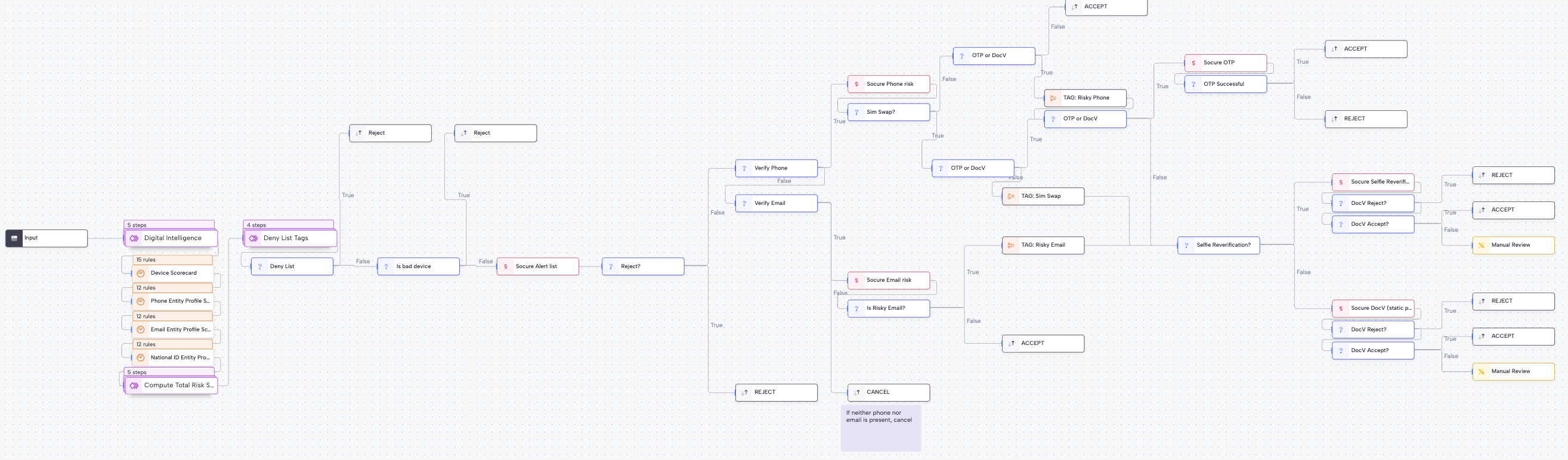
Execution flow in RiskOS™
Login and Authentication runs synchronously, with conditional asynchronous step-ups (for example, One-Time Passcode (OTP) or Document Verification) applied only when risk warrants additional verification.
Workflow components used by Login and Authentication
| Component | Purpose |
|---|---|
| Input | Collect session and identifier data |
| Enrichment | Evaluate device, phone, and email risk |
| Rule Score Cards | Aggregate device and behavioral risk |
| Condition | Apply thresholds and step-ups |
| On Hold | Pause workflow for OTP or DocV |
| Decision | Emit final authentication outcome |
Configure Login and Authentication
Enable required enrichments
Your Socure account team provisions a standard Account Takeover workflow with the following entitlements:
- Digital Intelligence
- Alert List
- Phone Risk
- Email Risk
- SIM Swap
- One-Time Passcode
- Document Verification
Configure Allow / Deny lists
Configure allowlists and denylists for:
- Email addresses
- Phone numbers
- IP addresses
- Devices
The workflow evaluates these lists early in the process.
Configure inputs and routing
Typical configuration steps include:
-
Digital Intelligence scorecard
- Assign positive or negative weights to risk signals.
- Use the aggregated score to determine when to reject or step up.
-
Reject conditions
- Reject when identifiers appear on deny lists.
- Reject when phone or email risk is high and SIM swap checks fail.
-
Step-up triggers
- Configure OTP or DocV when risk thresholds are exceeded or signals conflict.
You can start from the account_takeover_v1_06042025 workflow template to accelerate setup.
If you’re unsure how to tune thresholds or routing, reach out to support with context about your use case.
Save and publish
Once your workflow is configured, publish it to go live.
Most customers start with a Socure-provided best-practice workflow and iterate over time.
Workflow testing checklist
Updated about 19 hours ago