

Set up Sigma Synthetic Fraud
Learn how to set up Sigma Synthetic Fraud in the RiskOS™ Dashboard to detect and block synthetic identity attacks.
Before you start
Make sure you have the following:
- Your account owner or administrator can enable this for you. If you're unsure who to contact, contact support for assistance.
- If this is your first time working with workflows, review the Workflow overview to understand inputs, enrichments, routing logic, and decisions.
How it works
Sigma Synthetic Fraud is a fraud detection enrichment available in RiskOS™. It evaluates identity attributes against consortium data to identify signals associated with synthetic identity fraud.
Sigma Synthetic Fraud returns:
-
Model scores: Normalized synthetic fraud risk scores generated by one or more models.
-
Reason codes: Indicators that explain the contributing factors behind synthetic risk signals.
These outputs can be used to inform routing, step-up verification, review, or escalation decisions in your workflows.
How Sigma Synthetic Fraud fits into a workflow
In RiskOS™, workflows are built by connecting reusable components. Sigma Synthetic Fraud is added as an Enrichment step.
Once the enrichment runs, its outputs are available to downstream workflow components, including:
- Conditions
- Decision rules
- Rule score cards
- Manual review steps
- Final decisions
For more detail on these components, see Workflow Steps.
Execution flow in RiskOS™
Sigma Synthetic Fraud runs synchronously as part of a RiskOS™ workflow. There is no user handoff or pause in execution.
flowchart LR
    A[Input]
    B[Sigma Synthetic Fraud]
    C[Routing logic]
    D[Decision]

    A --> B --> C --> D
At a high level, the execution flow looks like this:
-
Input
You call the Evaluation API with identity attributes. -
Sigma Synthetic Fraud enrichment
RiskOS™ evaluates the provided attributes and returns model scores and reason codes. -
Routing logic
The workflow evaluates synthetic fraud scores and reason codes. -
Decision
The workflow returns a final outcome (for example, Accept, Review, or Reject).
Workflow components used by Sigma Synthetic Fraud
Sigma Synthetic Fraud uses a subset of standard RiskOS™ workflow components.
| Component | Purpose | Typical input | Output / What to use next |
|---|---|---|---|
| Input | Start an evaluation | Identity attributes | Workflow execution begins |
| Enrichment | Detect synthetic identity fraud | — | Model scores, reason codes |
| Condition | Branch based on risk signals | Synthetic fraud outputs | Route to appropriate path |
| Decision Rule / Score Card | Apply policy or scoring logic | Synthetic fraud outputs | Pass/fail or cumulative risk classification |
| Decision | Emit final outcome | Routed value | Accept / Review / Reject |
Configure Sigma Synthetic Fraud
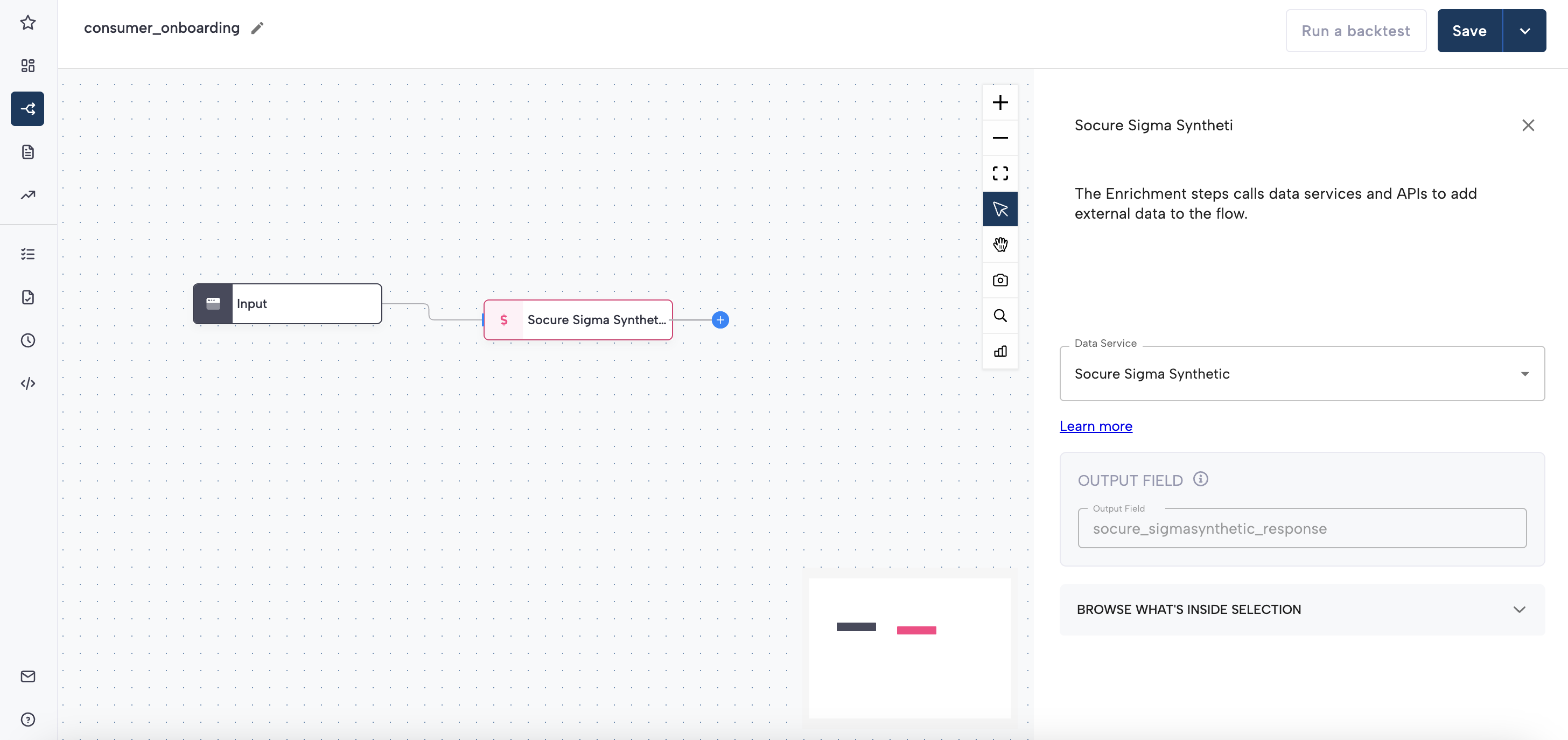
Add Sigma Synthetic Fraud to a workflow
- In the RiskOS™ Dashboard, go to Workflows and create a new workflow or open an existing one.
- On the workflow canvas, select the plus (+) icon.
- Add an Enrichment step and select Sigma Synthetic Fraud.
After the enrichment is added, its outputs can be referenced by downstream workflow logic.
Configure routing using model scores
Sigma Synthetic Fraud returns one or more model scores under:
socure_sigmasynthetic_response.synthetic.scoresEach score object includes:
score: Normalized risk score between0.001and0.999name: Model nameversion: Model version identifier
Using a single score
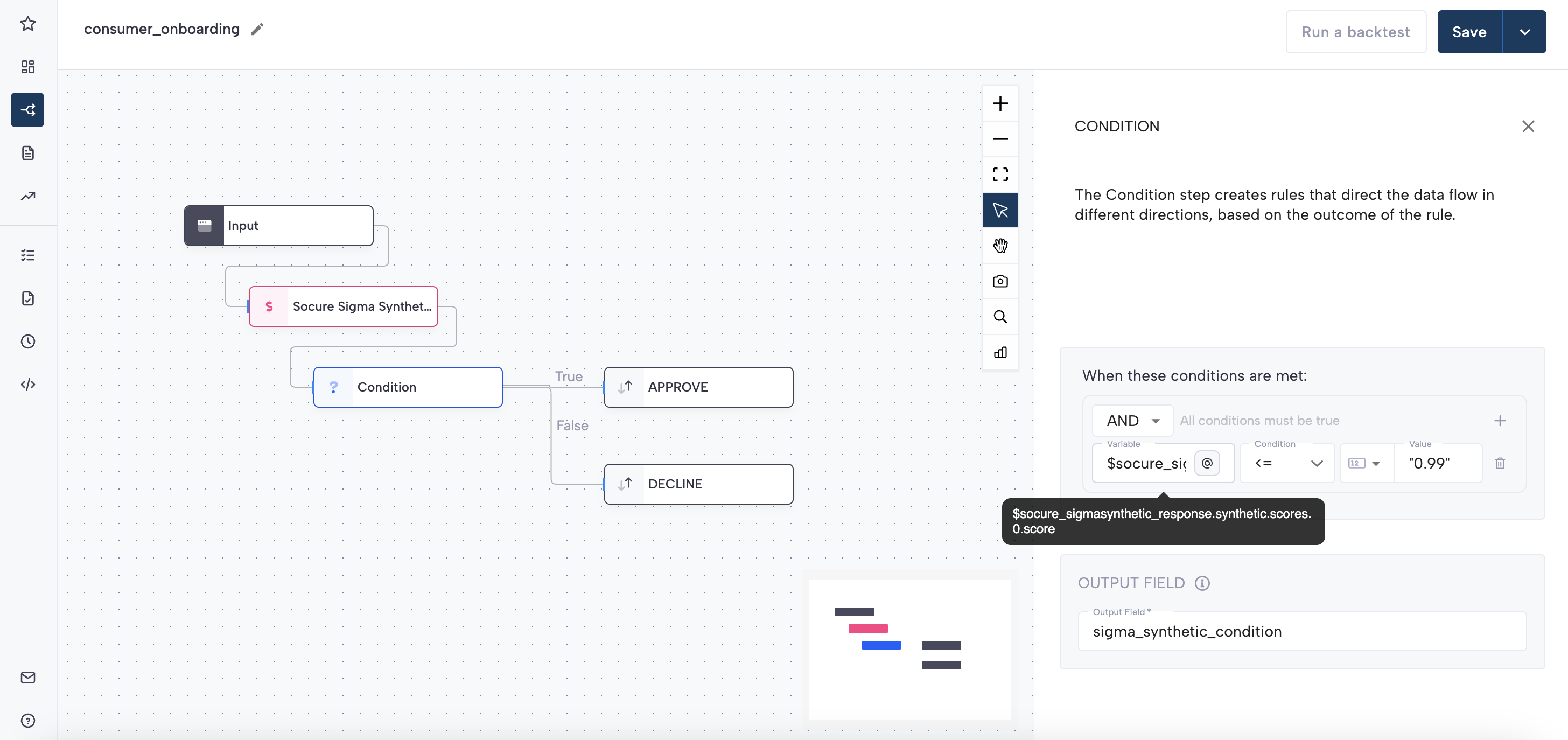
If your integration is configured to return a single model score, you can reference it directly when defining Conditions in your workflow, for example:
socure_sigmasynthetic_response.synthetic.scores.0.scoreCustomers typically define thresholds based on their own risk tolerance and downstream verification strategy. For integrations that receive only a single score in the response, Conditions can be added directly against socure_sigmasynthetic_response.synthetic.scores.0.score. A common starting thresholds is 0.99 for step-ups to eCBSV or Document Verification.****
Using multiple scores
If multiple model scores are returned, do not rely on the position of a score within the array. Instead, Conditions should evaluate both the score value and the associated model version.
For example, to evaluate whether a specific model version meets a given threshold, construct Conditions that:
- Check the
scorevalue, and - Confirm the corresponding
versionfield matches the intended model
This may require evaluating more than one element in the scores array, depending on your configuration.
Configure routing using reason codes
Reason codes are returned under:
socure_sigmasynthetic_response.synthetic.reasonCodesThis field contains an array of strings (for example, "R220") that explain contributing synthetic risk signals.
You can route based on reason codes by:
- Adding a Condition step
- Selecting the variable
socure_sigmasynthetic_response.synthetic.reasonCodes - Choosing array contains or array does not contain
- Providing the reason code value in quotes
Refer to the RiskOS™ Dashboard for the list of reason codes available for Sigma Synthetic Fraud.
Save and publish
Once your workflow is configured, publish it to go live.
Workflow testing checklist
Use this checklist to confirm accuracy, resilience, and completeness of the workflow before going live.
Updated about 19 hours ago