

Handle DocV Step-Up
Handle Predictive Document Verification (DocV) step-up in your KYC + Fraud + Watchlist integration.
Step 1: Detect the DocV step-up
Use this guide to handle DocV when an evaluation pauses and requires document capture before RiskOS™ can return a terminal decision.
Identify a DocV step-up by checking for all of the following in the evaluation response:
decision = REVIEWstatus = ON_HOLDoreval_status = evaluation_pauseddata_enrichmentscontains an object whereenrichment_provider = "SocureDocRequest"
Extract handoff assets
Locate the SocureDocRequest object and extract the following from response.data:
| Field | Purpose |
|---|---|
docvTransactionToken | Required. Pass this to your frontend to initialize the DocV SDK. |
url | Optional. Use for direct mobile redirects to the Capture App. |
qrCode | Optional. Base64 PNG for desktop-to-mobile handoff. |
Example response
{
  "decision": "REVIEW",
  "status": "ON_HOLD",
  "eval_status": "evaluation_paused",
  "data_enrichments": [
    {
      "enrichment_provider": "SocureDocRequest",
      "response": {
        "data": {
          "docvTransactionToken": "70c6a4bc-f646-4c6a-94c1-9cd428e356ef",
          "url": "https://verify.socure.com/..."
        }
      }
    }
  ]
}
What to do:
- Locate the
SocureDocRequestobject indata_enrichments. - Extract
docvTransactionTokenfromresponse.data. - Persist the
eval_idanddocvTransactionToken. - Send the token to your frontend and launch DocV.
- Wait for the final result via webhook or updated evaluation.
Step 2: Launch the Document Verification Web SDK
The DocV Web SDK is a client-side JavaScript library that embeds the RiskOS™ document verification experience directly into your application.
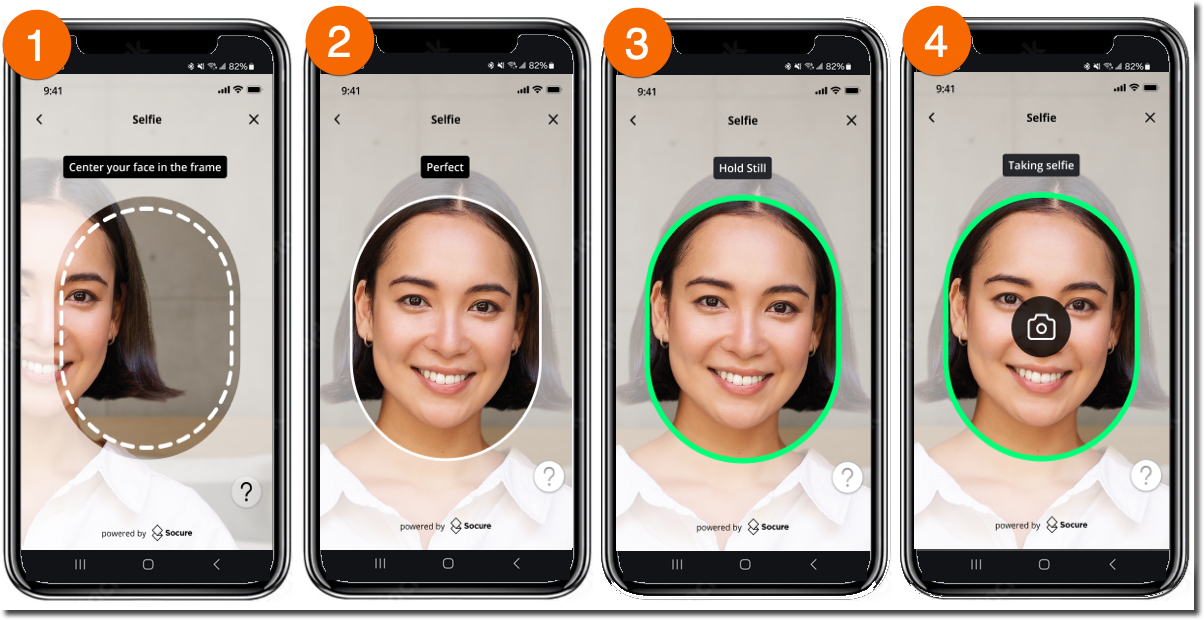
It renders the Capture App, a secure mobile experience that guides the user through:
- Capturing a government-issued ID
- Taking a selfie
- Completing liveness verification
The Capture App UI is configurable from the DocV App page in the RiskOS™ Dashboard.
- Include the DocV Web SDK script in your application.
- Pass your SDK key (from the RiskOS™ Dashboard) and
docvTransactionTokentoSocureDocVSDK.launch().
<html>
  <head>
    <script src="https://websdk.socure.com/bundle.js"></script>
  </head>
  <body>
    <button onclick="start()">Start Verification</button>
    <div id="websdk"></div>

    <script>
      var config = {
        onProgress: function (event) {
          /* Called during capture */
        },
        onSuccess: function (response) {
          /* Called on success */
        },
        onError: function (error) {
          /* Called on error */
        },
        qrCodeNeeded: true, // Show QR code option
        disableSmsInput: false, // Enable SMS input
        closeCaptureWindowOnComplete: true, // Auto-close tab after document upload confirmation
        autoOpenTabOnMobile: true, // Skip "Continue on New Tab" screen on mobile and launch Capture App in a new tab
      };
      function start() {
        SocureDocVSDK.launch(
          'SDKKey', // Replace with your SDK Key
          'docvTransactionToken', // Replace with the docvTransactionToken
          '#websdk',
          config // optional
        );
      }
    </script>
  </body>
</html>
Handoff options
Depending on your integration pattern, users can access the Capture App using:
- QR code for desktop-to-mobile handoff
- Secure SMS link for desktop or mobile
- Mobile redirect URL using
response.data.url
No resubmit: Treat DocV as a one-time step-up for the evaluation. If the step-up fails, RiskOS™ completes the evaluation and you should route the user to your fallback/manual flow (typically a final REJECT decision is delivered via webhook).
iOS and Android apps:
You can launch the Capture App by redirecting the user to the DocV URL returned in the Evaluation response.
data_enrichments[n].response.data.urlIf you include
data.individual.docv.config.redirect.urlin your Evaluation request, the user will be redirected back to your app after capture completes. See the integration guides for iOS Webview or Android Webview for advanced SDK configuration and mobile patterns.
Step 3: Receive the final decision
DocV is asynchronous. After the Capture App flow completes, RiskOS™ resumes the paused evaluation and returns the final result.
Use one of the following approaches:
- Wait for an updated evaluation
- Receive the final result through a webhook event
To receive the final decision by webhook, configure a webhook endpoint on the Developer Workbench > Webhooks page in the RiskOS™ Dashboard.
Final routing
After DocV completes:
- Wait for the final
decision - Route based on the terminal response
- Do not re-submit DocV for the same evaluation
Routing outcomes:
ACCEPT→ Continue onboarding (for example, create account or grant access)REJECT→ Route to your fallback, manual review, or decline flow
Important:
Do not route on
REVIEW. This indicates the evaluation is still in progress.
Example routing logic
if (data.decision === "ACCEPT") {
  router.push("/success");
}

if (data.decision === "REJECT") {
  router.push("/review");
}
Key takeaways
- Detect DocV using
SocureDocRequestindata_enrichments. - Persist
eval_idanddocvTransactionToken. - Launch DocV once — do not re-submit for the same evaluation.
- Wait for the final decision before routing the user.
Error handling
If the API returns an HTTP error (4xx or 5xx), your application should handle it before processing any evaluation logic.
| Status code | Meaning | What to do |
|---|---|---|
400 | Bad request — missing or invalid fields | Check request body against required fields. |
401 | Unauthorized — invalid or missing API key | Verify your Authorization header. |
404 | Not found — invalid eval_id or endpoint | Confirm the eval_id and endpoint URL. |
429 | Rate limited | Back off and retry after the Retry-After header value. |
500 | Internal server error | Retry with exponential backoff (max three attempts). |
For the full error schema and all error codes, see the Errors Reference.
Data handling
What to persist
Store these fields for tracking:
| Field | Description |
|---|---|
id | Unique identifier for the request |
eval_id | Evaluation identifier |
decision | Final decision outcome |
status | Overall request status |
eval_status | Evaluation processing status |
workflow | Workflow name |
Updated 5 months ago