

Process DocV with Socure Pass Results in Hosted Flow
Redirect users to the hosted flow, process webhook events, and route users based on the final decision for Document Verification with Socure Pass.
Evaluation flow
After creating the evaluation and redirecting the user to the Hosted Flow, RiskOS™ manages the verification experience — authenticating returning users via Socure Pass, collecting consent, and guiding new users through Document Verification. The evaluation_completed webhook contains the final, authoritative decision.
1. Returning user (valid Socure Pass)
If the user has a valid, non-expired Socure Pass, they authenticate using their passkey and consent to share previously verified identity data.
No document scan or selfie is required. The evaluation completes using the reused data.
2. New user (first-time verification)
If the user does not have a Socure Pass, they complete standard Document Verification.
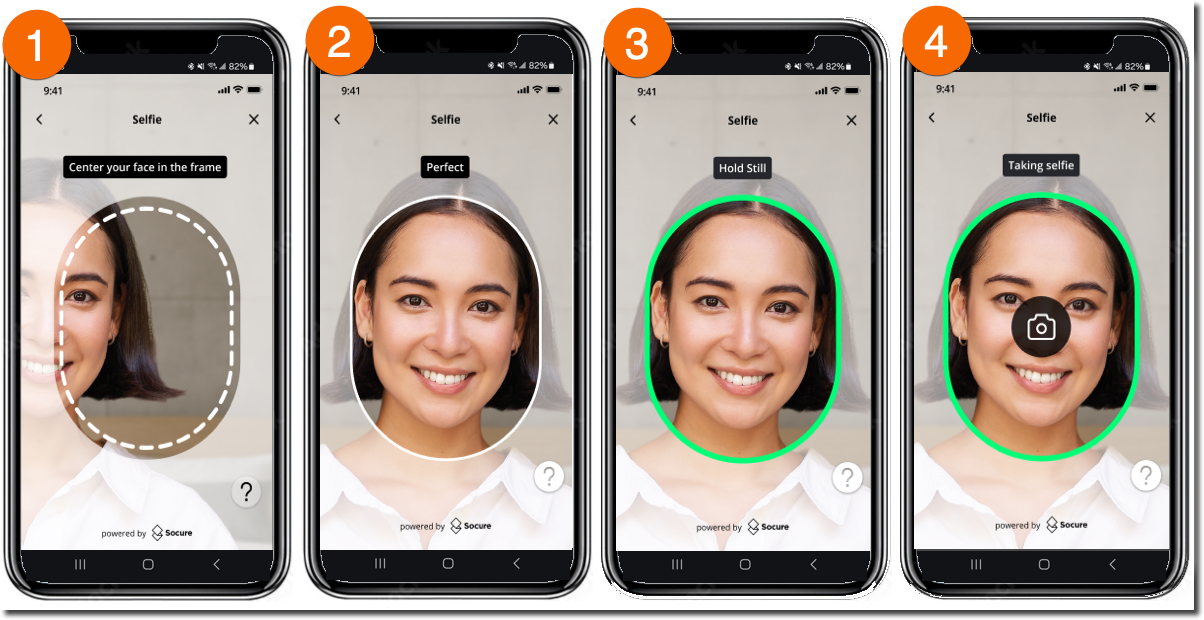
The hosted flow renders the Capture App, where the user:
- Scans their ID
- Captures a selfie
- Completes liveness checks
After a successful verification, the user may be enrolled in Socure Pass for future reuse.
3. Returning user (re-verification required)
If the user has a Socure Pass but their document is expired or no longer valid, they must complete Document Verification again.
This follows the same Capture App flow as a new user. After a successful verification, the system updates their Socure Pass with the new document.
Receive the final decision (webhook)
After the Hosted Flow completes, RiskOS™ sends an evaluation_completed webhook to your configured webhook endpoint.
The final outcome is in:
data.decision
Important:
The webhook payload differs depending on which path the user takes. If the user selects "Verify with Socure Pass," the enrichment comes from the
SocurePassprovider. If the user selects "Continue with Standard Verification," the enrichment comes from the standard Document Verification provider. Your integration must handle both response shapes.
{
  "event_type": "evaluation_completed",
  "event_id": "3b31289c-2d4a-4107-80bc-dda63031d5a0",
  "data": {
    "eval_id": "2b74fe41-bf69-484a-82c7-4630f5846fa6",
    "decision": "ACCEPT",
    "status": "CLOSED",
    "tags": [
      "Socure Pass Triggered",
      "Socure Pass Has Data",
      "DocV Accept"
    ],
    "data_enrichments": [
      {
        "enrichment_provider": "SocurePass",
        "response": {
          "individual": {
            "given_name": "Jane",
            "family_name": "Doe",
            "date_of_birth": "2000-05-01"
          }
        }
      }
    ]
  }
}
See the full Socure Pass reuse payload
This is one complete, realistic evaluation_completed webhook for the Socure Pass reuse path — the full envelope around the SocurePass enrichment, so you must not piece it together from the previous truncated example.
All values are illustrative Sandbox data. The decision your workflow returns depends on your configured thresholds.
{
  "event_type": "evaluation_completed",
  "event_id": "3b31289c-2d4a-4107-80bc-dda63031d5a0",
  "event_at": "2026-02-17T14:26:23.104Z",
  "data": {
    "id": "client-transaction-12345",
    "eval_id": "2b74fe41-bf69-484a-82c7-4630f5846fa6",
    "workflow": "docv_socure_pass",
    "workflow_id": "5937a624-f298-452c-9169-ceeae9e66b74",
    "workflow_version": "2.95.0",
    "environment_name": "Sandbox",
    "eval_source": "API",
    "evaluation_status": "evaluation_completed",
    "decision": "ACCEPT",
    "status": "CLOSED",
    "sub_status": "Accept",
    "tags": [
      "Socure Pass Triggered",
      "Socure Pass Has Data",
      "DocV Accept"
    ],
    "review_queues": [],
    "data_enrichments": [
      {
        "enrichment_name": "Socure Pass",
        "enrichment_provider": "SocurePass",
        "status_code": 200,
        "response": {
          "individual": {
            "given_name": "Jane",
            "family_name": "Doe",
            "date_of_birth": "2000-05-01"
          }
        },
        "is_source_cache": false,
        "total_attempts": 1
      }
    ]
  }
}
When the user authenticates with a valid Socure Pass, no document scan or selfie is required — the evaluation completes using the reused identity data in response.individual.
{
  "event_type": "evaluation_completed",
  "event_id": "a4c92f1e-8b3d-4a17-9c5e-f2d8e7b61a03",
  "data": {
    "eval_id": "11111111-2222-3333-4444-555555555555",
    "decision": "ACCEPT",
    "status": "CLOSED",
    "tags": [
      "Document Verification Triggered",
      "DocV Accept"
    ],
    "data_enrichments": [
      {
        "enrichment_provider": "SocureDocRequest",
        "response": {
          "referenceId": "ed6a5077-b272-4a75-8c21-b284e10927cd",
          "status": "SESSION_COMPLETE"
        }
      },
      {
        "enrichment_provider": "Socure",
        "response": {
          "documentVerification": {
            "scores": {
              "activeModelVersion": "0.1.0",
              "activeModelScore": 0.02
            },
            "decision": {
              "value": "accept"
            },
            "reasonCodes": [
              "I831",
              "I836"
            ],
            "documentData": {
              "firstName": "Jane",
              "surName": "Doe",
              "dob": "2000-05-01"
            }
          }
        }
      }
    ]
  }
}
See the full standard Document Verification payload
This is one complete, realistic evaluation_completed webhook for the standard Document Verification path — both the SocureDocRequest session entry and the Socure document verification result, so you don't have to piece it together from the truncated example earlier in this topic.
All values are illustrative Sandbox data. The decision your workflow returns depends on your configured thresholds.
{
  "event_type": "evaluation_completed",
  "event_id": "a4c92f1e-8b3d-4a17-9c5e-f2d8e7b61a03",
  "event_at": "2026-02-17T14:26:23.104Z",
  "data": {
    "id": "client-transaction-12345",
    "eval_id": "11111111-2222-3333-4444-555555555555",
    "workflow": "docv_socure_pass",
    "workflow_id": "5937a624-f298-452c-9169-ceeae9e66b74",
    "workflow_version": "2.95.0",
    "environment_name": "Sandbox",
    "eval_source": "API",
    "evaluation_status": "evaluation_completed",
    "decision": "ACCEPT",
    "status": "CLOSED",
    "sub_status": "Accept",
    "tags": [
      "Document Verification Triggered",
      "DocV Accept"
    ],
    "review_queues": [],
    "data_enrichments": [
      {
        "enrichment_name": "Socure Document Request - Default Flow",
        "enrichment_endpoint": "https://service.socure.com/api/5.0/documents/request",
        "enrichment_provider": "SocureDocRequest",
        "status_code": 200,
        "response": {
          "referenceId": "ed6a5077-b272-4a75-8c21-b284e10927cd",
          "status": "SESSION_COMPLETE",
          "data": {
            "docvTransactionToken": "7d6ad42b-f804-4255-b25e-268b8a77c86f",
            "url": "https://verify.socure.com/#/dv/7d6ad42b-f804-4255-b25e-268b8a77c86f"
          }
        }
      },
      {
        "enrichment_name": "Socure Document Verification",
        "enrichment_endpoint": "https://service.socure.com/api/5.0/documents/verify",
        "enrichment_provider": "Socure",
        "status_code": 200,
        "response": {
          "referenceId": "ed6a5077-b272-4a75-8c21-b284e10927cd",
          "documentVerification": {
            "reasonCodes": ["I831", "I836"],
            "documentType": {
              "type": "Drivers License",
              "country": "US",
              "state": "NY"
            },
            "scores": {
              "activeModelVersion": "0.1.0",
              "activeModelScore": 0.02
            },
            "decision": {
              "name": "standard",
              "value": "accept"
            },
            "documentData": {
              "firstName": "Jane",
              "surName": "Doe",
              "fullName": "Jane Doe",
              "dob": "2000-05-01",
              "documentNumber": "00000000",
              "expirationDate": "2029-05-07"
            }
          }
        }
      }
    ]
  }
}
The SocureDocRequest entry carries the session referenceId and status; the Socure entry carries the verification decision, reasonCodes, and parsed documentData. For the full field-by-field reference, see the DocV Webhook Payload Reference.
Route the user based on the final decision
Because the evaluation completes asynchronously, your frontend should wait for your backend to persist the final decision before routing the user.
Expose the persisted decision from your backend to the frontend (for example, via a status endpoint), then handle routing as follows:
ACCEPT→ Continue onboardingREJECT→ Route to your fallback, manual review, or decline flow
One common approach is polling your backend until the stored decision is available.
if (data.decision === "ACCEPT") {
  router.push("/success");
}

if (data.decision === "REJECT") {
  router.push("/review");
}Note:
Do not rely on
statusoreval_statusfor routing decisions. Usedata.decisionas the primary field.
Identify the verification path
Determine how the user was verified by checking tags or data_enrichments[].enrichment_provider.
See DocV API Integration for a full list of fields.
Socure Pass (reuse)
How to identify:
tagscontains"Socure Pass Triggered"data_enrichments[].enrichment_provider="SocurePass"
Verified data location:
data_enrichments[].response.individual
Standard Document Verification
How to identify:
tagscontains"Document Verification Triggered"data_enrichments[].enrichment_provider="Socure"or"SocureDocRequest"
Verified data location:
data_enrichments[].response.documentVerification.documentData
Review enrichment results
Use the data_enrichments array to access verified data returned from the completed verification path.
Socure Pass data
response.individual— Verified identity data returned from Socure Pass reuse
Document Verification data
response.documentVerification.scores.activeModelScore— DocV Omega calibrated fraud score from 0 to 1 (higher means greater fraud risk); decision on it as an alternative todecision.valueresponse.documentVerification.decision.value— DocV result (accept,reject,resubmit,review)response.documentVerification.reasonCodes— Reason codes explaining the resultresponse.documentVerification.documentData— Parsed identity data from the document (when available)
Session metadata (DocV only)
enrichment_provider = "SocureDocRequest"response.referenceId— DocV session identifierresponse.status— Session status (for example,SESSION_COMPLETE)
Note:
Socure manages the Hosted Flow verification experience. Your integration only needs to:
- Use the final
decisionfor routing- Identify which path completed
- Persist any verified data required by your application
Store required data
Persist these fields for tracking and reconciliation:
| Field | Description |
|---|---|
id | Unique identifier for the request |
eval_id | Evaluation identifier |
decision | Final decision outcome (ACCEPT or REJECT; initial REVIEW is non-terminal) |
status | Overall request status |
eval_status | Evaluation processing status |
workflow | Workflow name |
Key takeaways
- Socure manages the Hosted Flow verification experience.
- Wait for the
evaluation_completedwebhook before routing the user. - Use
data.decisionas the primary routing field. - Use
tagsandenrichment_providerto identify whether the user completed Socure Pass reuse or standard Document Verification. - Handle both Socure Pass and standard Document Verification response shapes.
- To retry a failed or expired verification, create a new evaluation.
Final integration validation checklist
POST /api/evaluation using the docv\_socure\_pass workflow
status = ON\_HOLD and a redirect\_uri
eval\_id for webhook correlation
redirect\_uri to launch the Socure-hosted experience
evaluation\_completed event
decision from data.decision
eval\_id
ACCEPT, allow the user to complete their intended action
REJECT, route the user to the global rejection experience
REVIEW response; wait for the evaluation\_completed webhook
Updated about 19 hours ago