

Enrichment Step
Add external data to RiskOS™ workflows using Enrichment steps that call Socure modules, third-party APIs, and custom ML models.
The Enrichment step calls data services and APIs to add external data to the workflow. This additional context improves decision-making and supports more accurate evaluations.
For example, an Enrichment step can call Phone Risk to score the phone number in the request, or call Watchlist to screen the applicant against global sanctions lists. Each step adds new signals that downstream Condition, Transformation, and Decision steps can act on.
How the Enrichment step works
An Enrichment step has three parts:
- Input — The step sends the relevant fields from the workflow payload (and, where applicable, the output of earlier steps) to the selected data service. You don't map inputs field by field; RiskOS™ passes the data each service requires.
- Data service — The step calls one data service: a built-in Socure module, a third-party provider, or your own custom API. Each step calls exactly one service.
- Output — The service returns a structured response (scores, reason codes, attributes, and validation results). RiskOS™ stores that response in the step's output field and returns it in the
data_enrichmentsarray of the Evaluation API response.
Key features
- Built-in Socure modules: RiskOS™ includes all existing Socure modules pre-integrated.
- Third-party data services: Connect with a variety of best-in-class external providers.
- Custom models: Integrate your own REST APIs or ML models for tailored enrichment.
For the complete catalog of available enrichments, see the Enrichments Overview. For third-party providers specifically, see Third-Party Data Services.
Note:
Data services must be enabled before they appear in the platform. Your account manager will activate all subscribed modules during integration.
Placement in a workflow
An Enrichment step can be placed almost anywhere in a workflow, depending on the signals your decision logic needs. Common patterns include:
- After the Input step to enrich the incoming PII before any evaluation.
- Before a Condition or Decision step so its output can drive branching or the final outcome.
- After a Transformation step when a service needs a normalized or derived value as input.
A workflow can include multiple Enrichment steps, including back-to-back steps. The order and number of steps aren't guaranteed to stay fixed, so design downstream logic to read enrichments by name rather than by position (see Integration best practices).
flowchart LR
    A[Input] --> B[Enrichment: Phone Risk]
    B --> C[Enrichment: Email Risk]
    C --> D[Condition]
    D --> E[Decision]
Configure an Enrichment step
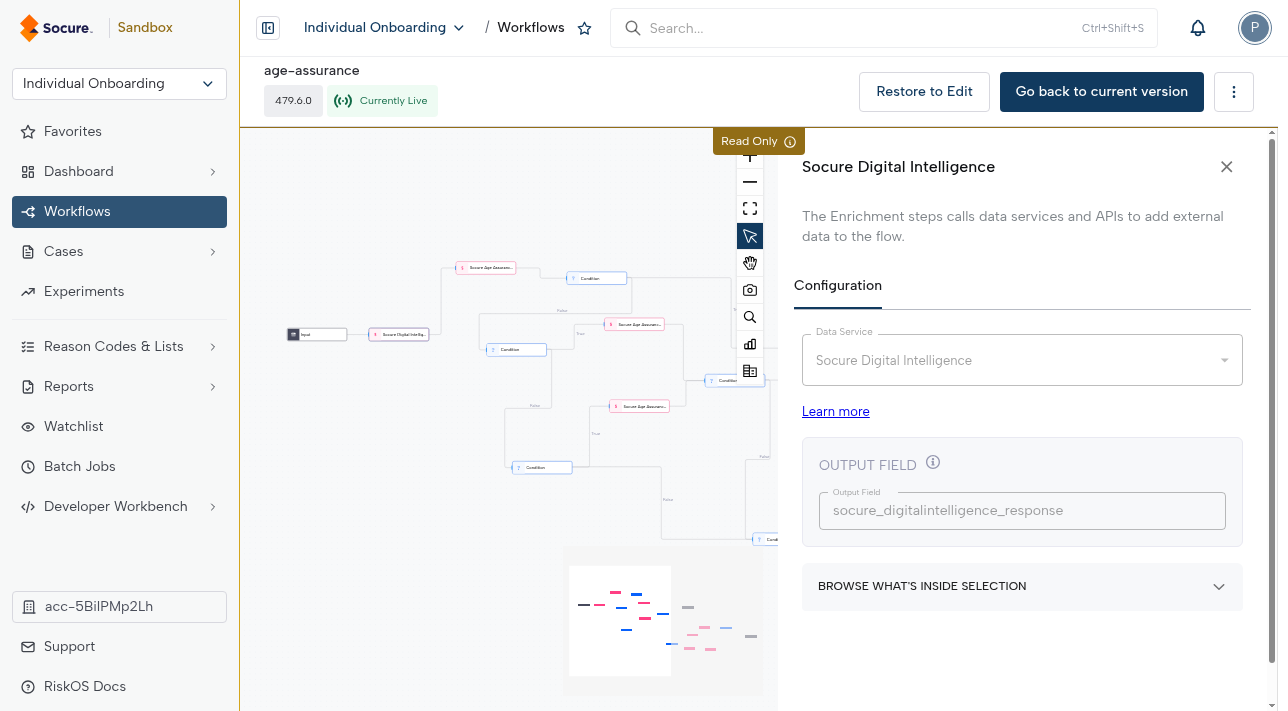
- Select the Enrichment step in the workflow canvas to open its configuration panel.
- Choose a Data Service from the dropdown menu. Select Learn more to open the documentation for the selected service.
- Review the Output field. This is where the API response is stored, and downstream steps (such as Condition, Transformation, and Decision) reference it by name.
- To review the returned payload of the selected service, expand the Browse What's Inside Selection card.
Note:
- A workflow can include multiple Enrichment steps, including back-to-back Enrichment steps if needed.
- You can customize the Enrichment step's label by editing the text field at the top of the side panel.
Read the enrichment output
Every Enrichment step writes its response to the output field shown in the configuration panel (for example, socure_digitalintelligence_response). Use this field to reference the enrichment's data in later steps.
To see exactly what a service returns before you build downstream logic, expand Browse What's Inside Selection. This displays the response as a searchable tree, so you can find the exact attribute you need and confirm its path.
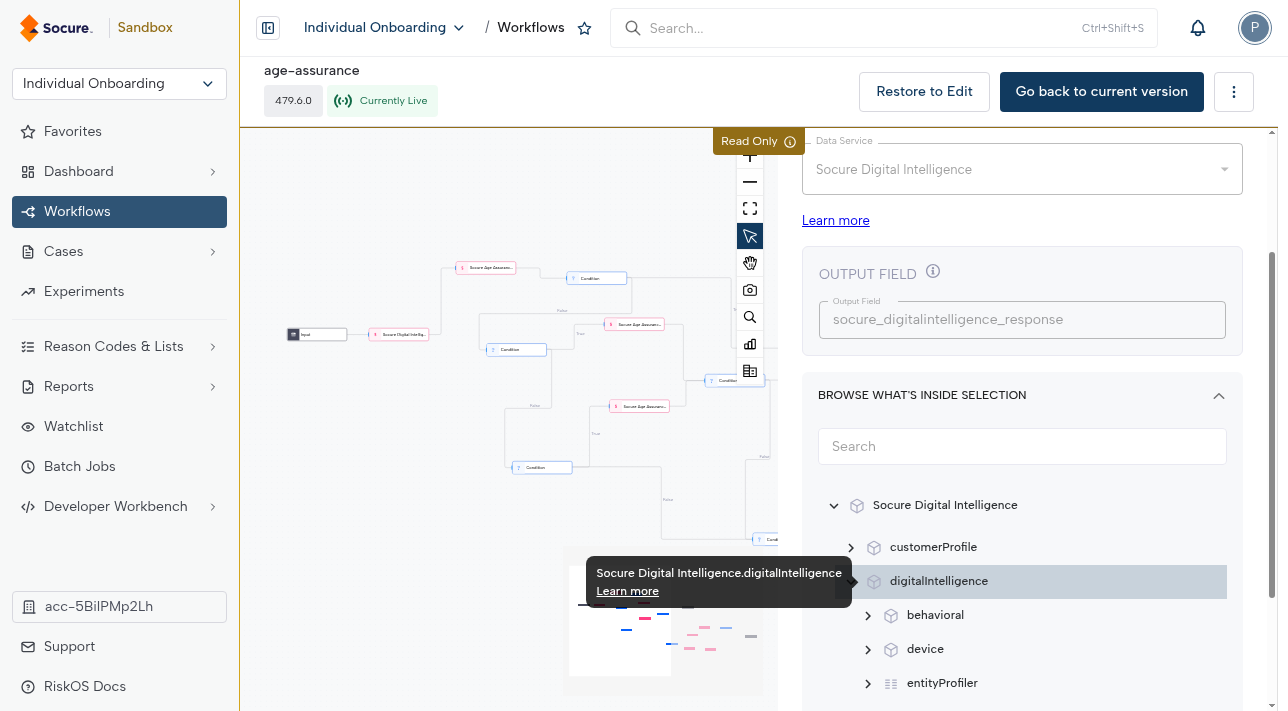
In the Evaluation API response, the same result appears as an entry in the data_enrichments array. Each entry identifies the enrichment and includes its request and response, so you can trace exactly what was called and what came back:
{
  "data_enrichments": [
    {
      "enrichment_name": "Socure Digital Intelligence",
      "enrichment_endpoint": "...",
      "enrichment_provider": "Socure",
      "request": { },
      "response": { }
    }
  ]
}
Example: enrich, then branch on the result
This example scores an incoming phone number and routes the applicant based on the result:
- Add an Enrichment step after the Input step and select Phone Risk as the data service. Note the output field, such as
phone_risk_response. - Add a Condition step after the Enrichment step. Reference a field from
phone_risk_response(for example, the phone risk score) and set a threshold. - Route each branch of the Condition to a Decision step so a high-risk score can send the applicant to review while a low-risk score continues to accept.
Because the Condition reads the enrichment by its output field name, the logic keeps working even if you reorder steps or add more enrichments later.
Troubleshoot enrichment errors
If an enrichment call fails or times out, RiskOS™ can retry the call, apply fallback logic, or branch on the error so the workflow keeps running. For retry behavior, fallbacks, and condition-based error branching, see Enrichment Error Handling.
Integration best practices
- Every API response from an Enrichment step is returned in the
data_enrichmentsarray of the evaluation API response. - Design your integration to handle multiple results in this array. A single workflow can include several Enrichment steps, and the set of enrichments may evolve over time.
- Do not hard-code against specific enrichment step names or positions.
- The order and number of enrichment steps are not guaranteed. Always parse the enrichment array and identify the enrichment you need by name or metadata.
- Keeping your integration flexible ensures that workflow changes don't break downstream systems.
Call a custom API
The Enrichment step can also call an internal custom API—for example, a machine learning model hosted in your own infrastructure—to bring proprietary signals into your workflow.
When to use
- You have internal risk models or services that should participate in real-time decisions.
- You need signals not available from built-in Socure modules or third-party providers.
How to request
This capability may require enablement. Coordinate with your account manager or email [email protected] for assistance.
Typical configuration (high level)
- Endpoint URL: Your service's HTTPS endpoint.
- Method & payload mapping: Configure the HTTP method and map input fields from the workflow payload.
- Auth & headers: Provide required headers (e.g., API key, bearer token).
Best practices
- Minimize latency: Keep the custom API fast and cache results where appropriate.
- Return stable JSON: Use predictable keys and types to simplify downstream logic.
- Version your API: Expose a versioned path to avoid breaking changes.
- Graceful failure: On errors/timeouts, return clear indicators that the workflow can branch on.
Updated about 2 months ago