

Manual Review Step
Route RiskOS™ evaluations to human reviewers by configuring the Manual Review step with case status, queues, notes, and tags.
The Manual Review step ends a workflow by routing the evaluation to a human reviewer instead of returning an automated decision. It places the case in a review queue with a status you configure, so a reviewer can make the final call.
Use a Manual Review step when a case needs human judgment — for example, when a Condition or Rule Scorecard flags a borderline result that shouldn't be auto-accepted or auto-rejected.
flowchart LR
    A{Condition: borderline score} -->|True| B[Manual Review]
    A -->|False| C[Decision: Accept]
Configure a Manual Review step
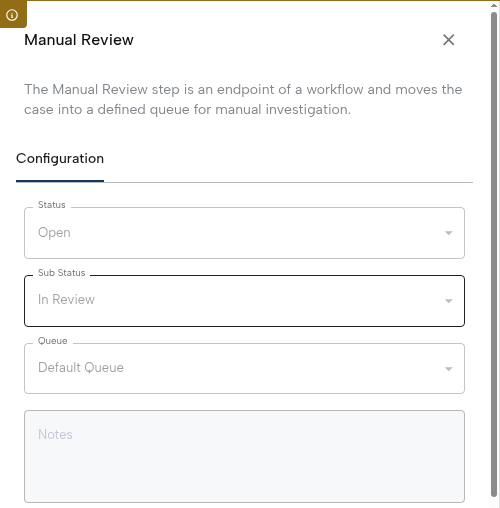
- Select the Manual Review step in the workflow canvas to open the side panel.
- Configure the case status and sub-status to apply when the workflow ends at this step.
- Select the review queue where the case will be placed.
- (Optional) Add a note to provide context or guidance for the reviewer.
- (Optional) Assign a tag for categorization and downstream filtering.
Note:
- You can customize the Manual Review step’s label by editing the text field at the top of the side panel.
- Every workflow must conclude with either a Decision step or a Manual Review step to ensure a definitive outcome.
Best practices
- Provide context: Use notes and tags to help reviewers understand why the case was routed for manual review.
- Keep queues organized: Assign cases to the correct queue to avoid bottlenecks and reduce handling time.
- Design fallback logic: Ensure that only cases requiring human judgment reach manual review, minimizing reviewer workload.
- Track resolution: Monitor case outcomes to refine workflows and reduce unnecessary reviews over time.
Updated about 2 months ago
Did this page help you?