

Overview
Use Local Graph in your RiskOS™ account to uncover fraud patterns in real time as they form within your ecosystem and stop them before they scale.
Local Graph is a client-specific graph that links users and identity elements, such as devices, emails, phone numbers, and IP addresses, through the events they appear in together. Every user and identity element in Local Graph carries its complete activity, along with real-time risk signals derived from that activity. For example, a device carries a count of rejected applications from it in the last hour, and a user carries a flag when a new device is observed for them.
Explore features
How it works
Local Graph updates in real time as events run through your RiskOS™ workflows. An event, or evaluation, includes all the data collected during the workflow run: what you send in the request, plus what the workflow adds, such as enrichment results and computed fields. Local Graph processes each event in four steps:
-
Identify entities
When an event runs through a workflow, Local Graph identifies the entities in its data. An entity is a user or identity element, such as a device, email, phone number, IP address, or national ID. Each RiskOS™ use case comes with standard entities configured and can also include custom ones. Only events that run through a RiskOS™ workflow are added, and each client's graph is built only from its own events.
-
Set up connections
Local Graph connects every entity that appeared in the event. The event itself is the connection: entities are linked because they appeared together. Over time, each entity becomes connected to every entity it has appeared with (its linked entities), such as a device to every email and phone number used on it.
What each entity carries
For every entity, Local Graph keeps the following, updated in real time:
| What it holds | Example | |
|---|---|---|
| Activity | Every event the entity has appeared in, with each event's key details | Every onboarding application and login from a device |
| Linked entities | Every entity it has appeared with in an event | The emails and phone numbers used on a device |
| Signals | Values calculated from its activity over time windows | Onboarding applications from the device in the last hour |
Activity and linked entities give investigators the full context on an entity. Signals let workflow rules use that context in real time.
Example: a new application from a device seen before
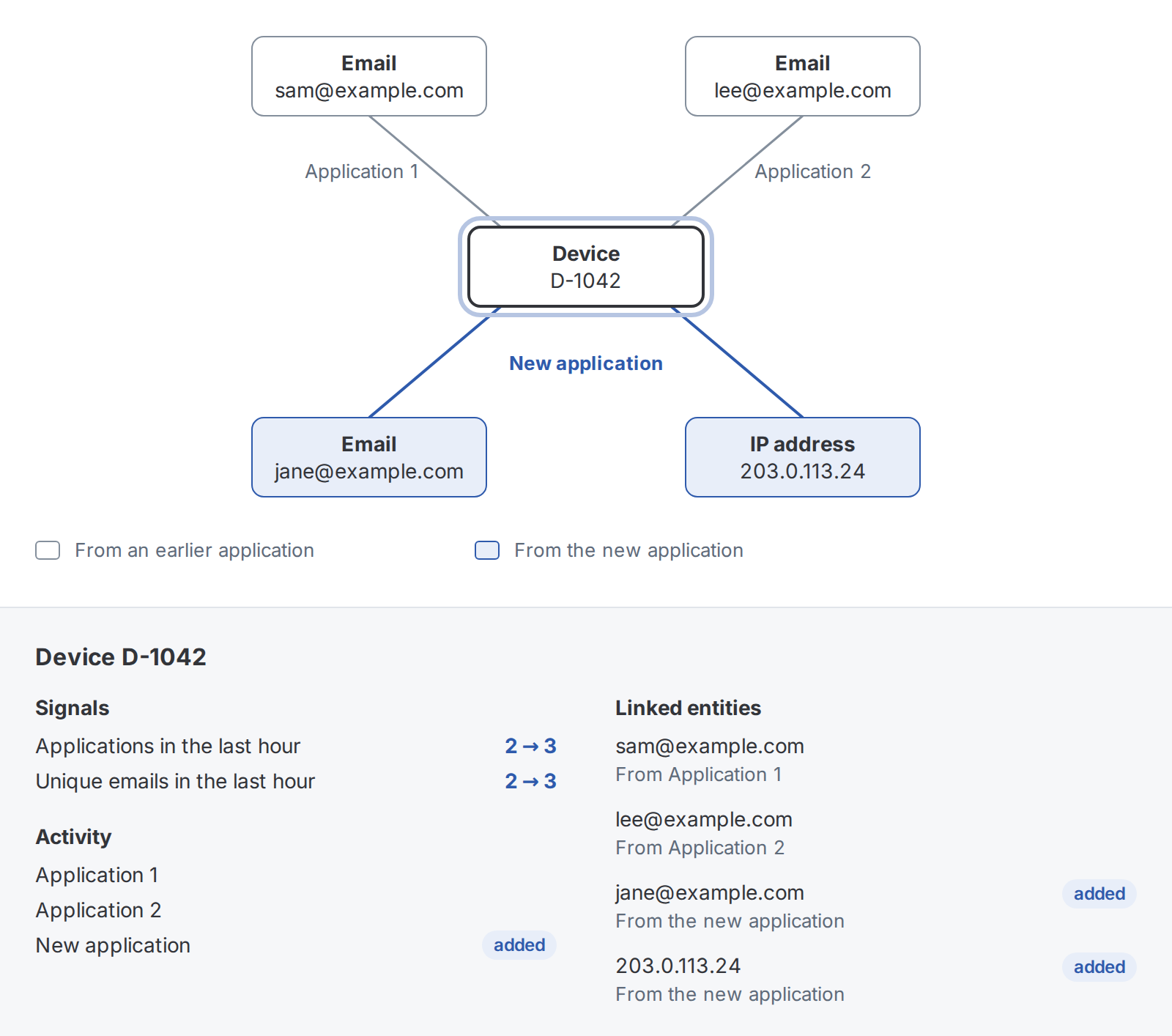
Device D-1042 has already been used for two onboarding applications in the last hour, with the emails [email protected] and [email protected]. A new application now comes in from the same device, with the email [email protected] and IP address 203.0.113.24.
- Identify entities: Local Graph identifies three entities in the new application: the email, the device, and the IP address.
- Match or create nodes: The device has been seen before, so it keeps its existing node. The email and IP address are new, so each gets a new node.
- Set up connections: Local Graph sets up a connection between each pair of the three entities, three in all. The device gets two new connections, to the email and the IP address. The third connects the email and the IP address.
- Update activity and compute signals: The application is added to each entity's activity, and their signals update. The device's applications in the last hour go from 2 to 3, and so do its unique emails. A workflow rule can flag this pattern.
Updated about 1 hour ago