
DocV Sandbox Testing
Test Predictive DocV in Sandbox using transaction tokens to simulate specific document verification decisions, reason codes, and outcomes.
Use Sandbox to simulate Predictive Document Verification (DocV) outcomes without using production data. You can optionally pass a transaction_token in your Evaluation request to force specific DocV decisions and reason codes.
How Sandbox works
- Sandbox returns predefined DocV results; it does not run full production models.
- If you do not pass a
transaction_token, DocV returns Accept with static fields/reason codes, regardless of the images scanned in the Capture App.- To retrieve images in Sandbox, include the Socure Image Request enrichment and add a WAIT (10 seconds) transformation step (details below). Without the wait, downloads often return
400 "No Documents Found".
Testing with real government-issued IDs
Sandbox doesn't verify real documents — it returns predefined results regardless of the images you submit. To verify real government-issued IDs with full production models and receive actual verification results, you must use the Production environment. See the Go-Live Checklist for steps to transition from Sandbox to Production.
Sandbox workflow overview
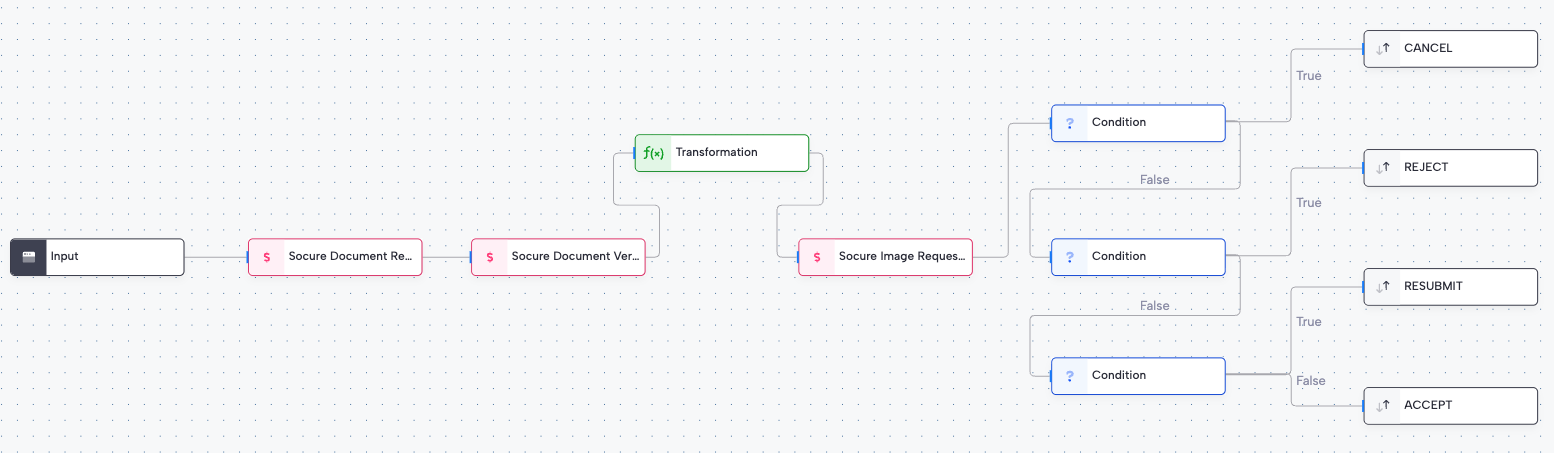
The following diagram shows the recommended workflow step order for Sandbox testing. The WAIT (10s) transformation step is required in Sandbox to ensure images are available for download.
- Document Request → (handoff to Capture App)
- Document Verification
- Transformation: WAIT (10s) (Sandbox only)
- Image Request
- Decision / routing
Prerequisites
RiskOS™ Sandbox URLs
- Dashboard & API base:
https://riskos.sandbox.socure.com - Evaluation endpoint:
https://riskos.sandbox.socure.com/api/evaluation - Download documents:
https://riskos.sandbox.socure.com/api/evaluation/{eval_id}/documents
Confirm your setup before testing:
- Workflow steps (in order):
Input → Document Request → Document Verification → WAIT (10s) → Image Request → Decision Logic → Decision - Flow configuration & setup: document types, selfie settings, link validity, and attempt limits. See Flow Configuration & Setup.
- Decision logic: route on
documentVerification.decision.value(accept/reject/review/resubmit) and/or reason codes. - Branding & copy: configure in Sandbox, then publish to Production. See Customize UI & Branding.
Step 1: Call the Evaluation Endpoint
For the full request schema, required fields, PII recommendations, and DocV config options, see API Integration: Calling the Evaluation Endpoint.
Default behavior (no token)
If you omit transaction_token in Sandbox:
- DocV returns
acceptwith static reason codes and staticdocumentData. - Outcome is the same regardless of uploaded images.
curl --request POST 'https://riskos.sandbox.socure.com/api/evaluation' \
  --header 'Authorization: Bearer <SANDBOX_API_KEY>' \
  --header 'Content-Type: application/json' \
  --data-raw '{
    "id": "sandbox-test-001",
    "timestamp": "2025-07-22T18:04:56Z",
    "workflow": "trust_and_safety",
    "data": {
      "individual": {
        "given_name": "Test",
        "family_name": "User",
        "date_of_birth": "1990-01-01",
        "phone_number": "+15555550123",
        "docv": {
          "config": {
            "send_message": true,
            "language": "en-us"
          }
        }
      }
    }
  }'
Force outcomes with transaction_token
transaction_tokenPass a transaction_token to simulate specific DocV decisions and reason codes. See Test Tokens for the full list of available tokens.
Where to put it: data.individual.docv.transaction_token
curl --request POST 'https://riskos.sandbox.socure.com/api/evaluation' \
  --header 'Authorization: Bearer <SANDBOX_API_KEY>' \
  --header 'Content-Type: application/json' \
  --data-raw '{
    "id": "sandbox-test-001",
    "timestamp": "2025-07-22T18:04:56Z",
    "workflow": "trust_and_safety",
    "data": {
      "individual": {
        "given_name": "Test",
        "family_name": "User",
        "date_of_birth": "1990-01-01",
        "phone_number": "+15555550123",
        "docv": {
          "transaction_token": "SOC75235600",
          "config": {
            "send_message": true,
            "language": "en-us"
          }
        }
      }
    }
  }'
Step 2: Complete the Capture App
From the Document Request enrichment response, launch the Capture App using the URL, QR code (Base64), or the SMS (if send_message: true). Complete front/back document capture and selfie (if required by your flow).
Note: In Sandbox, image content does not change the default outcome unless you sent a
transaction_token.
Step 3: Retrieve results
Workflow paused (handoff)
At Document Request, the Evaluation response includes url, qrCode (Base64), and docvTransactionToken. Workflow status is ON_HOLD / evaluation_paused until capture completes.
After capture (DocV results)
After the user completes the Capture App, the workflow continues to Document Verification. The response includes:
documentVerification.decision.value→accept | review | resubmit | rejectdocumentVerification.reasonCodes→ machine-readable flagsdocumentVerification.documentData→ extracted OCR/barcode/MRZ data- Optional
digitalIntelligence(device/network), when present
How to access results
-
Dashboard: Open the evaluation in RiskOS™ Sandbox.
-
Webhooks: Subscribe to:
case_notes_added(DocV event webhooks) — capture progressevaluation_completed— full results available
See DocV Webhooks.
-
Documents ZIP:
GET /api/evaluation/{eval_id}/documents— requires the WAIT (10s) step and the Socure Image Request enrichment in your workflow. The ZIP may include:user_uploaded/document_verification/documentfrontDoc_Front_1_blob.jpguser_uploaded/document_verification/documentbackDoc_Back_1_blob.jpguser_uploaded/vouched_id_verification/Doc_Selfie_1_blob.jpg
Test tokens
Use any token below in data.individual.docv.transaction_token to simulate the listed outcome:
| Name | Transaction Token | Decision | Reason Codes |
|---|---|---|---|
| Laura Smith | SOC23067038 | Reject — Biometric/Liveness | R834, I823, I845, I831, I820, I825, R836, I838, I824, I822 |
| Joan Jackson | SOC86753099 | Reject — Layout/Expired | I834, I823, I845, I831, I820, I825, I836, I838, I824, I822, R810, R827 |
| Luis Myers | SOC12031182 | Reject — Material/Data Match | I834, I823, I845, I831, I820, I825, I836, I838, I824, I822, R819 |
| Thomas Ingram | SOC75235600 | Resubmit — Headshot | I834, I823, I845, I831, R820, I825, I836, I838, I824, I822 |
| Charles Fischer | SOC01149403 | Accept | I834, I823, I845, I831, I820, I825, I836, I838, I824, I822 |
| Brett Whyte | SOC32671365 | Accept | I834, I823, I845, I831, I820, I825, I836, I838, I824, I822 |
| James Green | SOC29244496 | Review — Dates Invalid | I834, I823, I845, R831, I820, I825, I836, I838, I824, I822 |
| Trinidad Vargas | SOC17259150 | Resubmit — Input Correlation | I834, R823, I845, I831, I820, I825, I836, I838, I824, I822 |
Need more scenarios? Your Socure team can add custom Sandbox tokens for edge cases. Contact your Solutions Consultant team for more information.
Tips and Troubleshooting
- 401/403: Use your Sandbox RiskOS™ key and Sandbox base URL.
- Always Accept: That's expected if you omitted
transaction_token. Add one from the Test Tokens table to simulate other outcomes. - 400 "No Documents Found" (download): Ensure the Socure Image Request enrichment exists and the WAIT (10s) step precedes it. Confirm you're hitting the Sandbox download endpoint with the correct
evaluation_id. - Workflow never completes: Verify DocV steps are present and error handling returns resubmit or cancel (tag these for easy filtering).
Updated 17 days ago