
Integration Guide
Learn how to integrate Document Verification (DocV) + Watchlist in RiskOS™. This guide walks through generating an evaluation, embedding the Capture App, and handling final onboarding decisions.
Start buildingBefore you start
Before you begin your implementation, ensure you have the following ready:
riskos.sandbox.socure.com for all requests.evaluation_completed events.Postman Collection
The following Postman collection can be used to test the Document Verification (DocV) + Watchlist solution with the Evaluation endpoint.
Integration flow
This integration enables you to verify users are real people using a government-issued ID scan, a selfie, and automated sanctions screening.
- Government ID + selfie verification: Users complete a secure document capture flow to validate their identity
- Fraud detection: Catch fake IDs, deepfakes, and stolen documents
- Automated sanctions screening: Screen verified identities against global watchlists
- Global coverage: Accept government-issued IDs from 195+ countries
sequenceDiagram
    autonumber
    participant User as End User
    participant App as Your Platform
    participant Socure as Socure

    User->>App: Attempt action to trigger DocV
    App->>Socure: POST /api/evaluation with PII and DocV settings
    Socure-->>App: Respond w/ transaction token
    App-->>User: Show Web SDK to prompt document capture

    User->>Socure: Submit document images and selfie to Socure

    activate Socure
    Note over Socure: Process submission, run Document Verification & Watchlist Screening
    Socure-->>App: Final decision (ACCEPT / REJECT)
    deactivate Socure

    App-->>User: Show Onboarding Result
How it works
Set up your environment
Before integrating, configure your backend environment to handle secure REST API requests. Your server is responsible for all communication with RiskOS™ to ensure your
SOCURE_API_KEYis never exposed to the client.Integration architecture
- Backend: Communicates with RiskOS™ via REST API (cURL) using your secret API Key.
- Frontend: Collects user Identity data (PII) through the Predictive DocV SDK.
- Security: All identity data processing must happen server-to-server.
Configure your keys
Retrieve your credentials from the Developer Workbench.
Set environment variables
Store these variables securely on your server. Always use the Sandbox URL for testing.
# Server-side Environment Variables
SOCURE_API_KEY="your_api_key_here"
SOCURE_BASE_URL="https://riskos.sandbox.socure.com"
SOCURE_WORKFLOW_NAME="your_workflow_name_here"
Retrieve and verify identity data
Use the DocV & Watchlist workflow to retrieve verified PII while minimizing user friction. This workflow is asynchronous.
1. Collect required input
Your application must collect the following minimum required fields before initiating the workflow:
given_namefamily_namephone_numberaddress.country
Tip: Adding additional personally identifiable information (PII) can improve match accuracy.
2. Create an evaluation (
POST)Send a
POSTrequest to the Evaluation endpoint using the DocV & Watchlist workflow. This initiates the identity lookup.- Endpoint:
POST /api/evaluation
curl --location --request POST 'https://riskos.sandbox.socure.com/api/evaluation' \
--header 'Content-Type: application/json' \
--header 'Accept: application/json' \
--header 'Authorization: Bearer YOUR_API_KEY' \
--data-raw '{
    "id": "APP-123456",
    "timestamp": "2025-07-31T15:00:10.761Z",
    "workflow": "docv_watchlist",
    "data": {
        "individual": {
            "given_name": "John",
            "family_name": "Smith",
            "date_of_birth": "1989-05-07",
            "phone_number": "+19998887777",
            "address": {
                "line_1": "1234 N College Ave",
                "locality": "New York City",
                "major_admin_division": "NY",
                "country": "US",
                "postal_code": "10001"
            },
            "docv": {
                "config": {
                    "document_type": "license",
                    "send_message": true,
                    "language": "en-us",
                    "redirect": {
                        "method": "POST",
                        "url": "https://example.com/docv"
                    }
                }
            },
            "di_session_token": "eyJraWQiOi_di_token"
        }
    }
}'
Top-level fieldsField Type Required Description Example idString Required Required. Customer-defined unique identifier for the request. This value must be unique for each evaluation. Reusing an ID causes RiskOS™ to treat the request as a re-run and can impact processing behavior, results, and downstream workflows. "fb428165-6a1c-4d36-afbc-c8a946c1287d"timestampString <Date-Time>Required RFC 3339 timestamp indicating when the evaluation request was initiated by your system. "2026-02-17T14:22:06.628Z"workflowString Required Your environment-specific workflow identifier. You can find this value in the RiskOS™ Dashboard > Developer Workbench > Integration Checklist.
Note: The workflow name must be unique within your RiskOS™ environment. It is not scoped by use case and must identify a single active workflow for each Evaluation API request."KYC & Watchlist Screening: Direct API Integration"dataObject Required Main payload containing consumer information, device data, and event details for evaluation. → individualObject Required Primary identity object containing individual's information. See individualschema below.individualfieldsIncluding as much personally identifiable information (PII) as possible is strongly encouraged. Providing PII supports consent audits and consumer data requests, and it also improves match accuracy and overall verification performance.
Field Type Required Description Example given_nameString Required First name "John"family_nameString Required Last name "Smith"date_of_birthString Required Date of birth ( YYYY-MM-DD)"1989-05-07"phone_numberString Required Phone number in E.164 format. The API expects the standard E.164 format but tolerates hyphens and spaces for user convenience. "+19998887777"addressObject Required Consumer address See addressschema below.docvObject Conditional DocV configuration and capture settings See docvschema below.addressfieldsField Type Required Description Example line_1String Optional Street address line 1 "1234 N College Ave"line_2String Optional Street address line 2 "Apt 3C"localityString Optional City "New York City"major_admin_divisionString Optional State/province or region (ISO 3166-2) "NY"postal_codeString Optional ZIP or postal code "10001"countryString Required ISO 3166-1 alpha-2 country code "US"docvfieldsUse the fields in the table below to configure Predictive DocV in your workflow.
Field Type Required Description Example configObject Optional Configuration options controlling Capture App behavior and document verification flow for a given transaction. See configschema below.→ send_messageBoolean Optional Set to trueto send an SMS to the provided phone number with the document request URL. Defaults tofalse.
- US & Canada: sent from short code33436
- Other countries: sent from +1 (510) 330-19xxtrue→ languageString Optional Determines Capture App UI language. Defaults to en-us."en-us"→ use_case_keyString Optional Deploys a specific Capture App flow created in RiskOS™. Defaults to the account’s default flow or the flow configured in the RiskOS™ workflow. "default_capture_flow"→ redirectObject Optional Object containing post-capture redirect behavior. See redirectschema below.→ redirect.methodString Conditional Required if redirectis provided. AcceptsGETorPOST."POST"→ redirect.urlString Conditional Required if redirectis provided. The destination URL to send the consumer after capture. Can include query strings for transaction tracking."https://example.com/docv"→ document_typeString Optional Restrict to a single document type ( licenseorpassport) for a simplified flow. Users skip the document type selection screen when passed."license"Handling Step-Up: Triggering Document Verification
When an evaluation pauses, RiskOS™ is waiting for physical evidence (ID and selfie) to finalize a decision.
1. Detect the Pause
Identify a Step-Up trigger by monitoring for these specific values in the API response:
- Status:
eval_statusis"evaluation_paused"(orstatusis"ON_HOLD"). - Provider:
data_enrichmentscontains an entry whereenrichment_provideris"SocureDocRequest".
2. Extract Handoff Assets
Locate the
SocureDocRequestobject and extract the following fromresponse.data:Field Purpose docvTransactionTokenRequired. Pass this to your frontend to initialize the DocV SDK. urlOptional. Use for direct mobile redirects to the Capture App. qrCodeOptional. Base64 PNG for desktop-to-mobile handoff. { "eval_id": "500c6b88-9f5c-4d62-9422-163a59a343fe", "decision": "REVIEW", "status": "ON_HOLD", "eval_status": "evaluation_paused", "data_enrichments": [ { "enrichment_provider": "SocureDocRequest", "response": { "data": { "docvTransactionToken": "70c6a4bc-f646-4c6a-94c1-9cd428e356ef", "url": "https://verify.socure.com/#/dv/70c6a4bc-f646-4c6a-94c1-9cd428e356ef" } } } ] }3. Complete the Handoff
If a token is present, your backend should:
- Persist the
eval_idand token for later correlation with the webhook result. - Return the token to your client-side application.
- Transition the user to the identity verification UI to launch the SDK.
Response schema
Top-level fieldsField Type Description Example idString Your original request id, echoed back in the response."DOCV-CASE-001234"eval_idString (UUID) Internally generated for each evaluation; required for GET/PATCHrequests."e5c3b4b2-9e0f-44f2-9c6f-0a3a5f2b7b61"decisionString Final decision — PASS,REVIEW, orFAIL."REVIEW"statusString Case status in RiskOS™ — OPEN,CLOSED, orON_HOLD."ON_HOLD"eval_statusString Processing state — evaluation_pausedindicates Step-Up is required."evaluation_paused"tagsArray Labels explaining the decision (e.g., "Document Verification Triggered"). ["Document Verification Triggered"]data_enrichmentsfieldsField Type Description Example enrichment_nameString Name of the enrichment product. "Socure DocV"enrichment_providerString Provider identifier. Look for SocureDocRequest."SocureDocRequest"status_codeInteger HTTP status code of the enrichment call. 200responseObject Payload containing the DocV handoff assets. See responseschemaresponse.dataHandoff DetailsField Type Description docvTransactionTokenString Required to initialize the DocV Web SDK. urlString Direct link to the Socure-hosted Capture App. qrCodeString Base64-encoded PNG for desktop-to-mobile handoff. - Status:
Integrate with the DocV Web SDK
The DocV Web SDK is a client-side JavaScript library that embeds the RiskOS™ document verification experience directly into your application.
It renders the Capture App, a secure mobile experience that guides the user through:
- Capturing a government-issued ID
- Taking a selfie
- Completing liveness verification
The Capture App UI is configurable from the DocV App page in the RiskOS™ Dashboard.
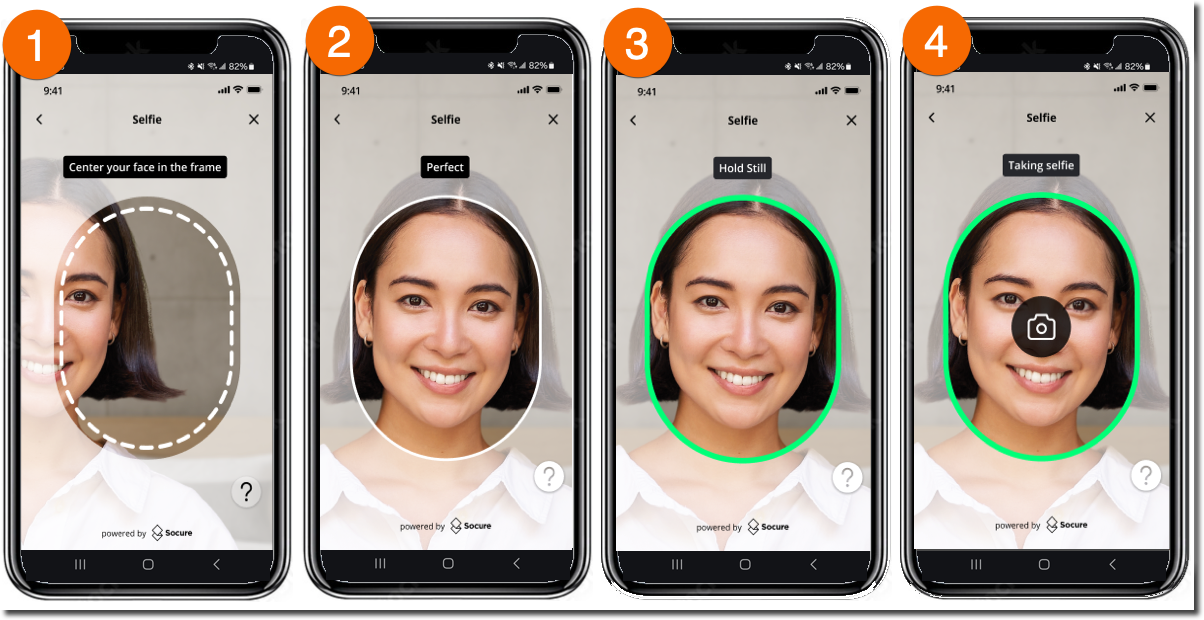
Quick start
- Include the DocV Web SDK script in your application.
Pass your
SDK key(from the RiskOS™ Dashboard) anddocvTransactionTokentoSocureDocVSDK.launch().
<html>
    <head>
    <script src="https://websdk.socure.com/bundle.js"></script>
    </head>
    <body>
    <button onclick="start()">Start Verification</button>
    <div id="websdk"></div>

    <script>
        var config = {
        onProgress: function (event) {
            /* Called during capture */
        },
        onSuccess: function (response) {
            /* Called on success */
        },
        onError: function (error) {
            /* Called on error */
        },
        qrCodeNeeded: true, // Show QR code option
        disableSmsInput: false, // Enable SMS input
        closeCaptureWindowOnComplete: true, // Auto-close tab after document upload confirmation
        autoOpenTabOnMobile: true, // Skip "Continue on New Tab" screen on mobile and launch Capture App in a new tab
        };
        function start() {
        SocureDocVSDK.launch(
            'SDKKey', // Replace with your SDK Key
            'docvTransactionToken', // Replace with the docvTransactionToken
            '#websdk',
            config[optional]
        );
        }
    </script>
    </body>
</html>
When the user clicks Start ID Verification, the Capture App launches inside
#websdk.Depending on your integration workflow, the user can access the Capture App using:
- QR code (desktop → mobile handoff)
- Secure SMS link (desktop or mobile)
- Mobile redirect URL (if you choose to redirect directly using
response.data.url)
iOS and Android apps:
You can launch the Capture App by redirecting the user to the DocV URL returned in the Evaluation response.data_enrichments[n].response.data.urlIf you include
data.individual.docv.config.redirect.urlin your Evaluation request, the user will be redirected back to your app after capture completes. See the integrtion guides for iOS Webview or Android Webview for advanced SDK configuration and mobile patterns.No resubmit: Treat DocV as a one-time step-up for the evaluation. If the step-up fails, RiskOS™ completes the evaluation and you should route the user to your fallback/manual flow (typically a final
REJECTdecision is delivered via webhook).Receive the final decision (Webhook)
After the Capture App flow completes, RiskOS™ resumes the paused evaluation asynchronously. The final result is delivered via a webhook event.
To receive the final decision, configure a webhook endpoint on the Developer Workbench > Webhooks page in the RiskOS™ Dashboard.
Listen for the
evaluation_completedeventRiskOS™ sends an
evaluation_completedevent when processing finishes. The final outcome is indata.decision.{ "event_type": "evaluation_completed", "event_id": "3b31289c-2d4a-4107-80bc-dda63031d5a0", "event_at": "2025-07-17T01:20:01Z", "data": { "eval_id": "11111111-2222-3333-4444-555555555555", "id": "client-transaction-12345", "workflow": "docv_watchlist", "workflow_id": "5937a624-f298-452c-9169-ceeae9e66b74", "workflow_version": "1.0.0", "environment_name": "Sandbox", "eval_source": "API", "eval_start_time": "2025-07-17T01:18:27Z", "eval_end_time": "2025-07-17T01:20:01Z", "eval_status": "evaluation_completed", "decision": "ACCEPT", "decision_at": "2025-07-17T01:20:01Z", "status": "CLOSED", "sub_status": "Accept", "tags": [], "notes": "", "review_queues": ["Default Queue"], "data_enrichments": [ { "enrichment_name": "Socure Document Request - Default Flow", "enrichment_endpoint": "https://service.socure.com/api/5.0/documents/request", "enrichment_provider": "SocureDocRequest", "status_code": 200, "response": { "referenceId": "ed6a5077-b272-4a75-8c21-b284e10927cd", "status": "SESSION_COMPLETE", "data": { "docvTransactionToken": "7d6ad42b-f804-4255-b25e-268b8a77c86f", "url": "https://verify.socure.com/#/dv/7d6ad42b-f804-4255-b25e-268b8a77c86f" } } }, { "enrichment_name": "Socure Document Verification", "enrichment_endpoint": "https://service.socure.com/api/5.0/documents/verify", "enrichment_provider": "Socure", "status_code": 200, "response": { "referenceId": "ed6a5077-b272-4a75-8c21-b284e10927c", "documentVerification": { "decision": { "name": "standard", "value": "accept" }, "reasonCodes": ["I831", "I836"], "documentType": { "type": "Drivers License", "country": "USA", "state": "CT" }, "documentData": { "firstName": "Kristiana", "surName": "Badwin", "fullName": "Kristiana Badwin", "dob": "1979-02-10", "documentNumber": "BAD1234567", "expirationDate": "2030-01-01" } } } }, { "enrichment_name": "Socure Global Watchlist Plus", "enrichment_endpoint": "https://sandbox.socure.com/api/3.0/EmailAuthScore", "enrichment_provider": "Socure", "status_code": 200, "request": { "city": "Danbury", "country": "US", "dob": "1979-02-10", "email": "[email protected]", "firstName": "Kristiana", "mobileNumber": "+19452414277", "modules": ["watchlistplus"], "nationalId": "", "parentTxnId": "11111111-2222-3333-4444-555555555555", "physicalAddress": "4 Moran Ave", "physicalAddress2": "Address Line 2", "riskOSId": "11111111-2222-3333-4444-555555555555", "state": "CT", "surName": "Badwin", "userId": "client-transaction-12345", "workflow": "docv_watchlist", "zip": "068100000" }, "response": { "customerProfile": { "userId": "client-transaction-12345" }, "globalWatchlist": { "matches": {}, "reasonCodes": ["I196"] }, "referenceId": "1ac4f38a-60cd-4cbe-8b66-111ba43f4d47" }, "is_source_cache": false, "total_attempts": 1 } ] } }Key response fieldsRiskOS™ returns a consistent set of top-level fields that describe the outcome of an evaluation, along with enrichment-specific results that depend on your workflow configuration.
Where to find specific resultsArea Fields How to use it Decision and routing decision,decision_at,tags,review_queues,notes,scorePrimary control signals. Branch application logic using decision. Use tags, queues, notes, and score for secondary routing, review, and explanation.Module results Module-specific fields (for example: reasonCodes, scores, extracted attributes)Evidence and signals produced by workflow modules. Use for escalation, compliance review, investigation, and audit. Identifiers and traceability id,eval_idPersist these identifiers to correlate API calls, logs, webhooks, GET requests, and support cases. Enrichment execution data_enrichments[](response,status_code,total_attempts,is_source_cache)Inspect enrichment outputs and detect provisioning issues, partial failures, retries, or cached responses. Workflow context workflow,workflow_id,workflow_versionUnderstand which workflow ran and which version produced the result. Useful for debugging and historical analysis. Evaluation lifecycle eval_status,status,sub_statusExecution and case state only. Useful for monitoring and asynchronous workflows. Do not use for business decisions. Execution context eval_source,eval_start_time,eval_end_time,environment_nameObservability and performance metadata for latency tracking, environment validation, and API vs Dashboard attribution. Decision and routing (primary control signals)Use these fields to determine what action your application should take.
decisionvalues are workflow-specific and may differ from the examples shown in this guide.Field Type Description Example decisionString (enum) Final evaluation result.
Possible values:
•ACCEPT
•REVIEW
•REJECT
Note: The fields returned can be customized to fit your integration or business needs."REVIEW"decision_atString <Date-Time>RFC 3339 timestamp when the decision was finalized. "2025-10-18T14:09:22.641Z"scoreNumber If configured for a workflow, provides an aggregate score of all steps. This can be used for risk banding, additional routing, or analytics alongside the primary decisionvalue.0.63tagsArray of Strings Array of labels applied during the workflow to highlight routing choices, notable signals, or rule outcomes. Useful for reporting, segmentation, or UI highlighting in the RiskOS™ Dashboard. []review_queuesArray of Strings Lists any manual review queues the evaluation was sent to. Empty when the case is fully auto-resolved without human review. []notesString Freeform text field for analyst or system comments about the evaluation. Often used to capture manual review rationale or investigation context. "Manual review recommended based on risk signals"Evaluation lifecycle and statusThese fields describe where the evaluation is in its lifecycle and are useful for monitoring and asynchronous workflows.
Field Type Description Example eval_statusString (enum) Indicates the current state of an evaluation in RiskOS™.
Possible values:
•evaluation_completed
•evaluation_paused
•evaluation_in_progress"evaluation_completed"statusString (enum) Indicates the current state of an evaluation or case.
Possible values:
•OPEN
•CLOSED"CLOSED"sub_statusString Provides additional detail about the evaluation status.
Example values:
•Under Review
•Pending Verification
•Accept
•Reject"Under Review"Identifiers and traceabilityUse these fields to correlate requests, logs, webhooks, and support cases.
Field Type Description Example idString (UUID or custom string) Your evaluation identifier within RiskOS™.
Note: This is customer-generated."APP-123456"eval_idString (UUID) RiskOS-generated unique identifier for the evaluation. "6dc8f39c-ecc3-4fe0-9283-fc8e5f99e816"workflow_idString (UUID) Unique identifier for the workflow run. "dc7f261e-b158-477e-9770-7e4eae066156"workflow_versionString Version of the executed workflow. "28.16.0"Execution contextThese fields provide timing and environment context for the evaluation.
Field Type Description Example eval_sourceString enum Indicates where the evaluation was initiated from.
Possible values:
•API: Request submitted via the Evaluation API.
•Dashboard: Case created or evaluated through the RiskOS™ Dashboard."API"eval_start_timeString <Date-Time>RFC 3339 timestamp for when RiskOS™ started processing the evaluation. Useful for latency and performance monitoring. "2025-10-07T23:50:03.60187976Z"eval_end_timeString <Date-Time>RFC 3339 timestamp for when RiskOS™ finished processing the evaluation. Can be paired with eval_start_timeto compute total processing time."2025-10-07T23:50:03.738794253Z"environment_nameString Indicates which environment the evaluation ran in. Typically Sandboxfor testing orProductionfor live traffic."Sandbox"Enrichment resultsEnrichment outputs are returned in the
data_enrichmentsarray.Field Type Description Example enrichment_nameString Name of the enrichment executed as part of the evaluation. "Socure DocV"enrichment_endpointString API endpoint used for the enrichment request. "https://sandbox.dev.socure.com/api/3.0/DocumentVerification"enrichment_providerString Provider responsible for the enrichment. "Socure"status_codeInteger HTTP status code returned by the enrichment provider. 200requestObject Payload sent to the enrichment provider (often redacted in documentation examples). { ... }responseObject Enrichment response payload containing DocV results. See documentVerificationresponse schema below.documentVerificationfieldsField Type Description Example reasonCodesArray of Strings List of rule or insight codes returned from DocV analysis. ["I834","I823","I826","I845","I820"]documentTypeObject Details about the document type provided for verification. See documentTypefieldsdecisionObject Result of the document verification analysis. See decisionfieldsdocumentDataObject Parsed data extracted from the submitted document. See documentDatafieldsreasonCodesare machine-readable flags that explain why a decision occurred (e.g., data mismatches, capture issues, authenticity checks). They appear under the DocV enrichment response and are intended for routing, UX, and review workflows.Where you’ll see them
data_enrichments.response.documentVerification.reasonCodes
How to use them
- Drive resubmission UX (e.g., prompt for glare removal if an image quality code is present).
- Route to manual review when authenticity or data consistency codes indicate risk.
- Log for audit and analytics.
The full catalog of reason codes and their descriptions is available in your Socure documentation/console or in the reason code list in the RiskOS™ Dashboard.
documentTypeField Type Description Example typeString Human-readable document type. "Drivers License"countryString Country associated with the document type. "USA"stateString State/region associated with the document type. "NY"Supported document types
Below are the document types you may encounter in
documentVerification.documentTypeand when configuring capture flows. Coverage and acceptance may vary by country and program.Document Type Description Drivers License A government-issued license permitting the consumer to operate a motor vehicle. Identification Card A non-driver government-issued photo ID for verifying identity. Passport An official government document certifying identity and nationality, used for international travel. Employment Authorization Card A document issued by USCIS that proves authorization to work in the U.S. Permanent Resident Card A document (e.g., U.S. Green Card) proving the consumer’s lawful permanent resident status. Passport Card A wallet-sized U.S. document used for land and sea travel between certain countries. Military ID An ID card issued by a country’s armed forces to identify active-duty or retired service members. Health Card An ID card issued by a government or insurer to access health services. Visa An official endorsement permitting the consumer to enter, stay, or work in a foreign country. Social Security Card A U.S. government-issued card showing the consumer’s Social Security Number (SSN). Weapons License A document permitting the consumer to carry or own firearms or other regulated weapons. Tribal ID Card A government-recognized identity card issued by a Native American or Indigenous tribe. Mexican Permanent Resident Card An identity document for foreign nationals authorized to live permanently in Mexico. decisionDocV responses are recommendations only. They are intended to inform your decisioning process and should be integrated into your organization’s broader risk strategy.
Field Type Description Example nameString Internal label representing the configured decision rule set (e.g., "lenient"or"strict")."lenient"valueString Outcome of the DocV analysis. One of:
•accept— Images met validation criteria and were verified.
•reject— Images failed some or all required validation criteria.
•resubmit— User must resubmit due to unacceptable image quality or missing data.
•review— Images did not meet configured criteria and should be manually reviewed. Returned only if enabled in your DocV Product Settings."reject"documentDataThe
documentDataobject contains the extracted data from OCR, barcode, or MRZ.If DocV cannot extract sufficient information due to poor image quality or unreadable fields, the
documentDataobject will not be present, and the decision will beresubmit.Field Type Description Example personalNumberString The personal identifier value extracted from the ID, when applicable.
Note: The meaning and availability of this value vary by country and document type, but it generally represents an identifier tied to the individual rather than the document itself (for example, a tax identification number or voter ID)."123456"personalNumberTypeString Indicates what the personal number represents. Supported values depend on the issuing country and document type. BRA_CPFfirstNameString First/given name parsed from the document. "John"surNameString Last/family name parsed from the document. "Smith"fullNameString Full name as printed on the document. "John Smith"addressString Single-line address string (as returned). "32194 N College Ave, New York City, NY 10001"parsedAddressObject Structured address parts extracted from address.See parsedAddressfieldsdocumentNumberString Document identifier/number. "00000000"dobString Date of birth (YYYY-MM-DD). "1989-05-07"issueDateString Document issue date (YYYY-MM-DD). "2021-01-12"expirationDateString Document expiration date (YYYY-MM-DD). "2029-05-07"barcodeObject Contains identity and license details parsed from the barcode of a government-issued ID. See barcodefields.parsedAddressfieldsField Type Description Example physicalAddressString Primary street address (line 1) of the parsed location. "32194 N College Ave"physicalAddress2String Combined city, state, and postal code as returned from parsing. "New York City NY 10001"cityString City component extracted from the parsed address. "New York City"stateString State, province, or regional code component extracted from the address. "NY"countryString ISO 3166-1 alpha-2 country code associated with the parsed address. "US"zipString Postal or ZIP code component extracted from the parsed address. "10001"barcodefieldsField Type Description Example firstNameString The individual’s given or first name as encoded in the barcode. "John"middleNameString The individual’s middle name or initial extracted from the barcode. "Larry"surNameString The individual’s last name or family name as encoded in the barcode. "Smith"nameSuffixString Any name suffix present, such as Jr., Sr., II, or III. "JR"complianceTypeString Code representing the license’s compliance type (e.g., Federal or state). "F"licenseClassString The class or category of license (e.g., commercial, operator, etc.). "C"Route the user based on the final decision
Because the evaluation completes asynchronously, your frontend should wait for your backend to persist the final decision, then route the user accordingly.
ACCEPT→ Continue onboardingREJECT→ Route to fallback or review flow
One common approach is polling your API until the stored decision changes.
if (data.status?.decision === "ACCEPT") {
  router.push("/success");
}

if (data.status?.decision === "REJECT") {
  router.push("/review");
}
Final integration validation checklist
POST /api/evaluation using your DocV & Watchlist workflowstatus = ON_HOLD and eval_status = evaluation_pausedeval_id and docvTransactionToken for webhook correlationREJECT flowevaluation_completed eventsdata.decision and persist it server-sideeval_idACCEPT, allow the user to complete their intended actionREJECT, route the user to the global rejection experienceREVIEW (if enabled), route the user to a pending or manual review stateUpdated 1 day ago